
PPC TRAINING
Summary: In this course, you'll discover the right strategies to effectively structure, monitor, and optimize your paid advertising operations, aimed at maximizing growth and profitability for your Seller Central account. Gain valuable insights and pro tips on enhancing efficiency to make the most out of your advertising investments.
This course will teach you:
- PPC terminology and basics
- ACoS Reduction Strategies, how to monitor relevancy, bid management, and budget control
- Keyword research, PPC structuring, campaign strategies, bid types and bulk operations
- How to utilize reports and troubleshoot your campaigns
Amazon thrives on treating PPC like a casino. We'll teach you how to count the cards and turn the tables on the house!
Why Use Amazon Advertising?
Amazon Advertising is the most powerful mechanism for sales generation on the internet, which makes it one of the most powerful sales generation machines in the world!
Amazon stands as the largest and most trusted online 'mall' in the country. With speed, convenience, competitive pricing, and a reassuring shopping experience, it outshines many brick-and-mortar competitors.
For the entrepreneurs - it’s the frontline of entrepreneurship. You can start your brand, ship your product directly to Amazon, scale to the USA, Canada, Mexico, UK, EU markets.
You will need to protect your product against your competitors from eating up real estate on your product page. That is what PPC is for Amazon Ads, and Paid Sales.
PPC can move your store from the mall's back, near a failed department store, to the prime spot at the main entrance, where heavy foot traffic thrives.
When a solo-entrepreneur starts with PPC, all he knows is how to “press the gas” and Amazon is very happy with that. If you want to spend money on ads and not be profitable, it’s totally ok, Amazon will be happy to take your money.
Course Curriculum
Section 1: Terminology
Understanding the Basics
ACoS & TACoS Benchmarks 101
Practice - Find Break Even ACoS
Practice - How to Find TACoS
Section 2: Campaign Basics
Types of Advertising Campaigns
How Does Amazon PPC Work?
What are Sponsored Products?
Campaigns Accessible for Brand Registered Accounts
Bid Strategy Management
How to Utilize Different Match Types
Bids by Placement
Keyword Research and Segmentation
Section 3: ACoS Reduction Strategies
How to Monitor Relevancy
Utilization of Search Term Reports
Scalable Bid Management
Budget Control & Management
Section 4: PPC Campaign Launch
Keyword Research & Segmentation
Developing PPC Structure
Campaign Strategies
Bid Types & Management
Using Advertising Reports
Bulk Operations
Section 5: DSP + Attribution Targeting - The Final Frontier
DSP vs. Display
DSP - A Closer Look
Section 6: Troubleshooting
Suspensions
Hidden Suspensions
SKU level selection issues
PPC Intro - Terminology and Key Metrics
Step 1: Basic Terminology
Summary:
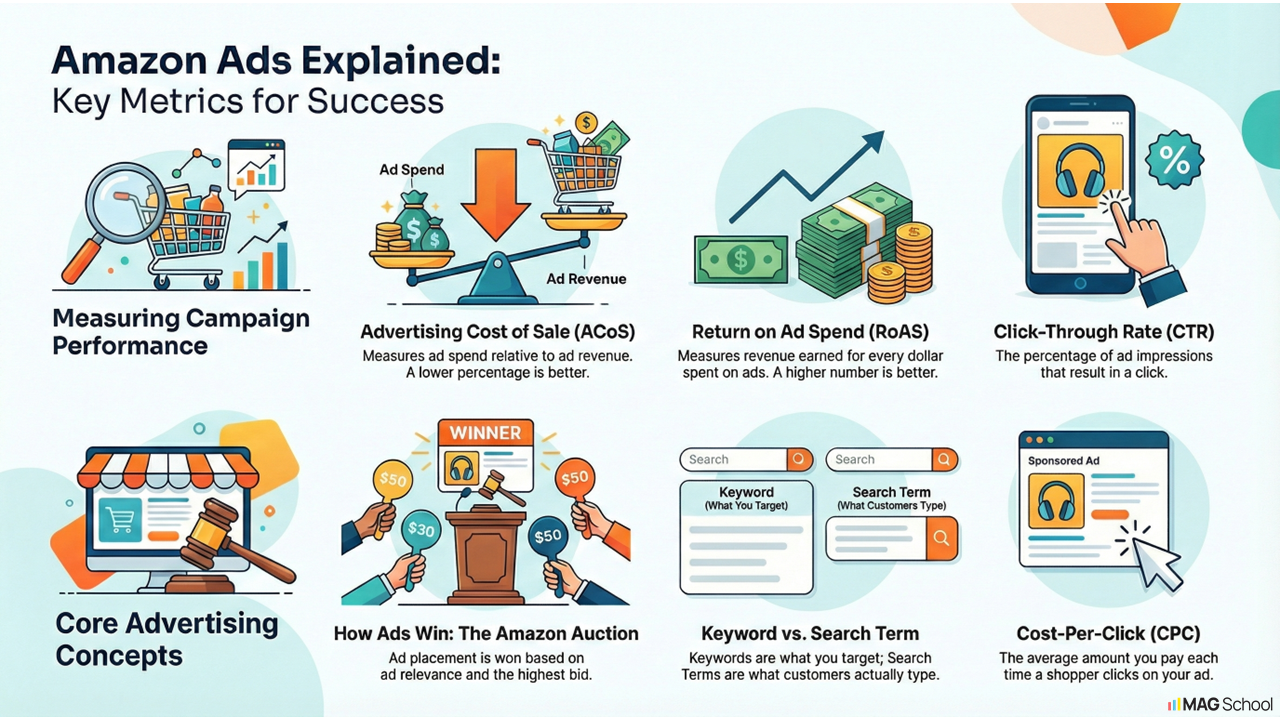
To run successful paid advertising campaigns, it's crucial to speak the language of eCommerce fluently. Below is a list of key terms you must fully grasp to navigate the world of paid advertising effectively.
ACoS - Advertising Cost of Sale (%)
- Key metrics advertisers use to measure the performance (read efficiency or profitability) of a given advertising campaign on Amazon.
- ACoS = (Ad Spend ÷ Sales) x 100
For example, if an ad campaign spends $100 and generates $500 in sales, the ACoS would be:
ACoS = ($100 ÷ $500) x 100 = 20%
Advertising Spend
- The total amount of money allocated to advertising efforts on Amazon. It is the total amount of money that the seller pays Amazon to run their ads on the platform.
Auction
- Amazon PPC works on a bidding system, where sellers bid on certain keywords or product categories that are relevant to their products, and pay each time a user clicks on their ad. Any ad that you see as you scroll down the Amazon page after entering any sort of search, has "won" the auction.
- Amazon looks primarily at 2 factors to determine a winner at auction: (1) How relevant an ad is to the consumer's search and (2) Who's the highest bidder on that search behavior.
Budget
- The maximum amount of money that can be spent on a campaign in a given 24 hour period. If you set a daily budget at $20, this means you will not spend more than $20 on a given day.
Bid
- The amount that an advertiser is willing to pay for each click. On Amazon, sellers can choose between automatic or manual bidding.
Click
- When a shopper clicks on a displayed Ad.
Conversion
- An action that a customer completes; this phrase can be used to refer to any number of actions, including clicking “Add to Cart,” completing a purchase, etc. Effectively, this just means the consumer took the action you wanted them to take. On Amazon, this will commonly (but not always) be synonymous with a sale.
Conversion rate
- In Amazon PPC, the conversion rate refers to the percentage of clicks on an advertisement that result in a sale or a desired action, such as adding a product to the cart, subscribing to a service, or downloading an app.
- For example, if an ad receives 100 clicks and generates 10 sales, the conversion rate would be 10%. A higher conversion rate indicates that the ad is effective in driving relevant traffic and converting it into paying customers.
CPC - Cost-per-click
- The average amount you pay each time someone clicks on your ad.
- CPC = Ad Spend ÷ Clicks
For example, if an advertiser spends $100 on an ad campaign that receives 500 clicks, the CPC would be:
CPC = $100 ÷ 500 = $0.20
CTR - Click-through Rate
- Measures the percentage of impressions that result in clicks. This is helpful for evaluating the relevancy of keywords that you're bidding on. It can also indicate how strong your listing optimizations are in comparison to the competition.
Impression
- In Amazon PPC, an impression refers to the number of times an advertisement is displayed on Amazon's search results or product pages. An impression is counted each time an ad is displayed to a user, regardless of whether the user clicks on the ad or not.
Keyword
- Any search term or phrase a customer might enter into Amazon search in order to locate a product.
Placement
- Advertising placement is where an advertisement is displayed. On Amazon, ads are shown on mobile and desktop. Found at the top of search, and product display pages.
RoAS - Return on Advertising Spend
- RoAS measures the effectiveness of an ad campaign by calculating the ratio of revenue generated to the advertising spend.
- It effectively expresses the same thing as ACoS, but as whole number instead of %.
- Another way to look at RoAS and ACoS is as mirrors of one another. Instead of measuring the averages cost of a sale, RoAS measures the return in dollars earned, per dollar spent.
- ROAS = Revenue ÷ Ad Spend
For example, if an ad campaign generates $1,000 in revenue and spends $100 on advertising, the ROAS would be:
ROAS = $1,000 ÷ $100 = 10
Search Term
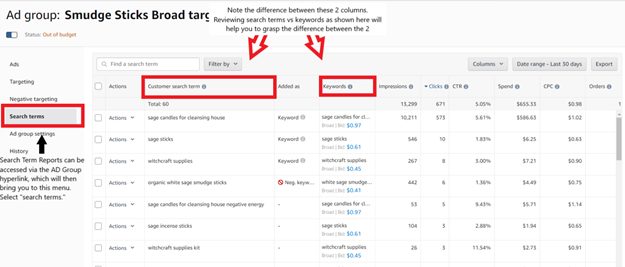
- A search term is the actual word or phrase that a shopper enters into Amazon's search bar to find a product. A keyword is the term that sellers use to target their ads. When a shopper searches for a product, Amazon matches the search term to relevant keywords and displays ads that target those keywords.
- Often confused with keywords from a PPC perspective, search terms within Amazon reports refer to where your ads appear. Essentially, keywords refer to the consumer behavior you're targeting, while search terms are the actual behaviors consumers took.
TACoS - TRUE/TOTAL Advertising Cost of Sale
- Not the delicious Mexican treat, unfortunately. True/Total ACoS, or TACoS refers to advertising spend relative to total revenue generated.
- While ACoS utilizes directly at the relationship between ad spend and ad revenue, TACoS looks at ad spend in the context of its relationship to TOTAL revenue (organic + advertising), which will give you a holistic look at whether your advertising strategy is having the intended effect of growing your brands consumer awareness on Amazon over time.
Key Takeaways:
- You CANNOT effectively manage Amazon Advertising Campaigns without first understanding some of the key terms and metrics used to measure advertising reach and engagement.
Step 2: ACoS & TACoS Benchmarks 101
Summary: ACoS and TACoS are vital advertising metrics. They gauge campaign performance and require benchmarks within your account to assess success.
Why does ACoS/TACoS Matter? ~ These are the key metrics e-commerce marketers use to measure efficiency, assessing the average return on their ad dollars.
Video Learning Media:
- View this video in correlation with the written material.
What's a Good ACOS for Amazon Seller Central? Advertising Cost of Spend. Break Even Ads Produce SEO
What's a Good ACOS for Amazon Seller Central? Advertising Cost of Spend. Break Even Ads Produce SEO
Figuring out your ACOS Benchmark:
- ACoS, or Advertising Cost of Sales, is the ratio of ad spend to ad sales. It's calculated by dividing Advertising Spend by Advertising Revenue, expressed as a percentage ( %).
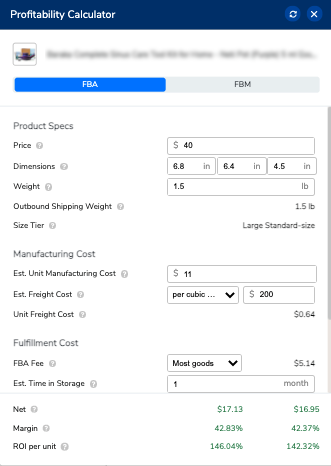
- First, you need to understand your break-even ACoS by finding the profit margin.
- You can easily do this by entering the landed cost (manufacture cost + shipping) information into the H10 Profitability Calculator(refer to image below).
- See a video example here.
- Any ACoS below that profit margin % is a profitable sale, anything above, you're paying for that sale.
- For new launches, achieving break-even or higher ACoS is common to gain traction for that specific listing.
- Once the listing matures (Watch this video and learn from Steven how to optimize an Amazon listing), optimize the campaigns, and receive organic ranking to high volume search terms, the ACoS will come down and you can start to focus on profitable sales through advertising.
- PPC sales influence organic ranking. If you get 10 PPC sales at a break-even ACoS, and this boosts your organic ranking resulting in 20 organic sales for the same search term, it's a net gain. This is where TACoS becomes crucial.
Figuring out your TACoS benchmark:
- TACoS, or Total Advertising Cost of Sales, is the relationship between ad spend and total sales, encompassing both paid and organic. This metric provides a comprehensive view of account health and is a key focus for most clients.
- Again, each client will have different goals but as a standard:
- Anything below 10% is leaving money out on the table. Instead, spending more to acquire additional ad sales would further increase the top-line revenue at a profitable rate.
- A TACoS between 10-20% signifies a maintenance mode, where profits are maintained while focusing on sales growth.
- Anything above 30% is typically above break-even profit margins.
- Just like ACoS, new product launches will start off at a higher TACoS and should trend downwards as the listing matures.
- To find the TACoS, divide your total advertising spend by your total sales revenue and then multiply it by 100.
Key Takeaway: "Without clear goals, any path will do." Benchmarks are crucial for accurately measuring advertising campaign success. Tracking the return on ad spend over time is vital.
Step 3: Practice - Find Break Even ACoS
Summary of Action:
Now that you know how to find the break-even ACoS and the importance of knowing this metric, let's practice.
Instructions/Steps:
- Go to the Revenue Calculator on Amazon https://sellercentral.amazon.com/revcal
- Get the ASIN of the product and search for the product
- Select the product
- Add the cost of sales (PPC expenses)
- Check your gross profit margin
On Ads Console:
- Select the campaigns for this product, and choose a date range.
- Check your ACoS on this product. ACoS will show how much you spend in relation to your Ads Sales.
On Seller Central:
- Now, navigate to your Seller Central, Reports, Business Reports
- Click on Detail Page Sales and Traffic
- Set the date range to the same period on your Ads Console
- Look for the Ordered Product Sales for the same ASIN.
- If you divide (Total Ad Spend) / Ordered Product Sales *100 = TACoS. This is your True Advertising Cost of Sales.
- Now Subtract your Gross Profit Margin - TACoS = NET PROFIT MARGIN of this product in the date range you select.
- Now you will be able to calculate how profitable your products are!
Step 4: Practice - How To Find TACoS
Summary of Action: Remember, to find the TACoS, divide your advertising spend by your total sales revenue and then multiply it by 100. Let's practice!
Video Instructions: TACoS Video
03 April, 2022 - howtofindtacos-1080p
Instructions:
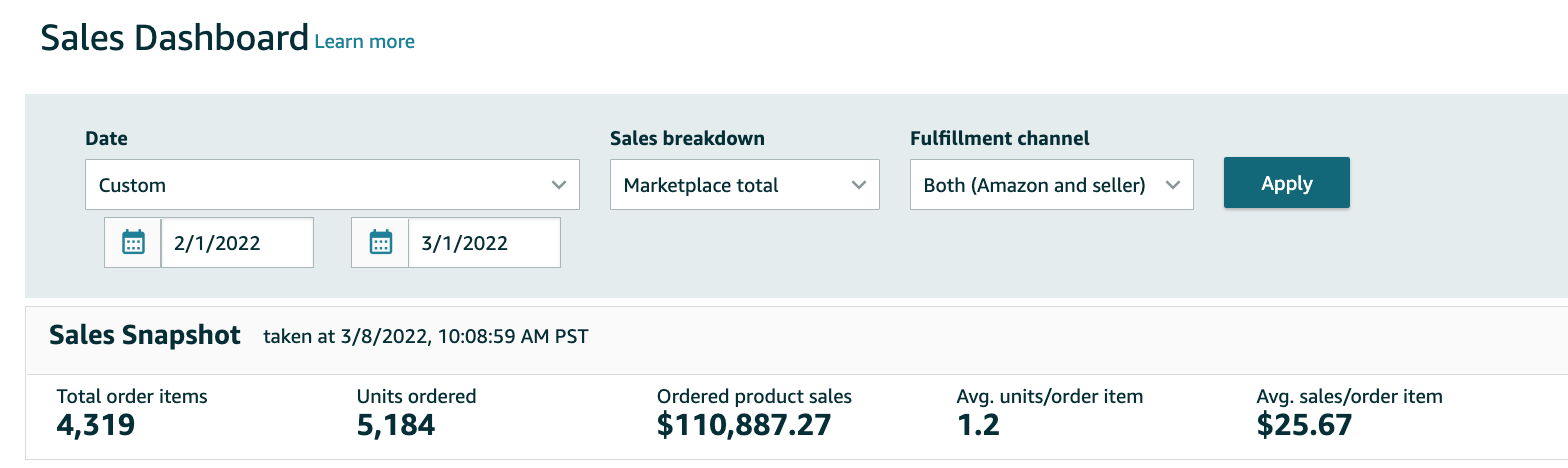
- View these screenshots of ad spend within the last 30 days and total revenue within the last 30 days.
- Determine the TACoS for this client.
Total Revenue:
Total AD Spend:

Campaign Basics
Step 1: Types of Advertising Campaigns
Summary:
This module covers various Amazon advertising campaign types, outlining their benefits and limitations. Just like a cohesive team, each campaign type serves a specific purpose within a well-structured advertising strategy.
What is an 'advertising campaign' anyway?
An Amazon campaign is an ad placement within the Amazon marketplace, designed to drive traffic to your brand, products, and listings, ultimately boosting your sales volume.
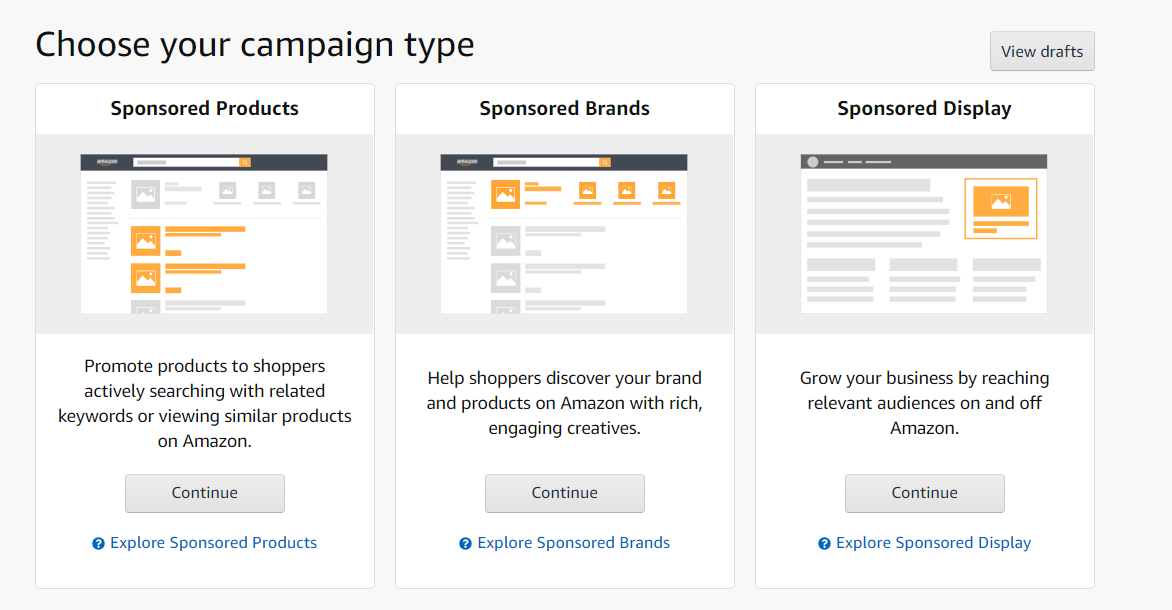
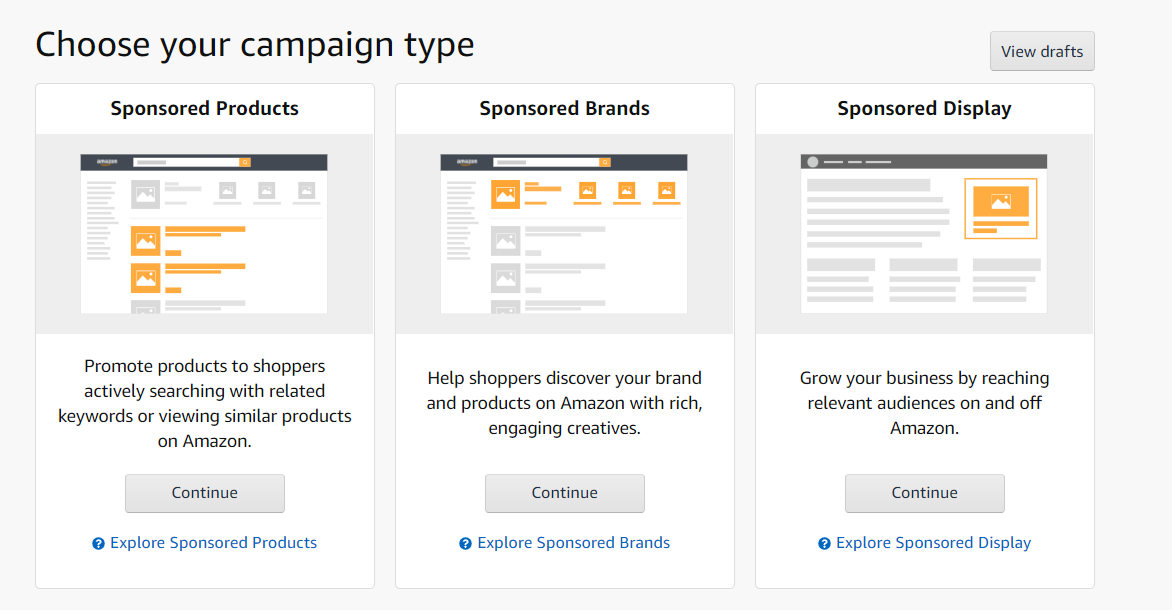
Though each 'campaign type' can have sub-classifications, there are generally three main sponsored ad types used on Amazon.
PPC FULL GUIDE - Amazon Advertising
Media:
- View this chapter of Steven Pope's video on Starting with Amazon PPC, which covers different Campaign types
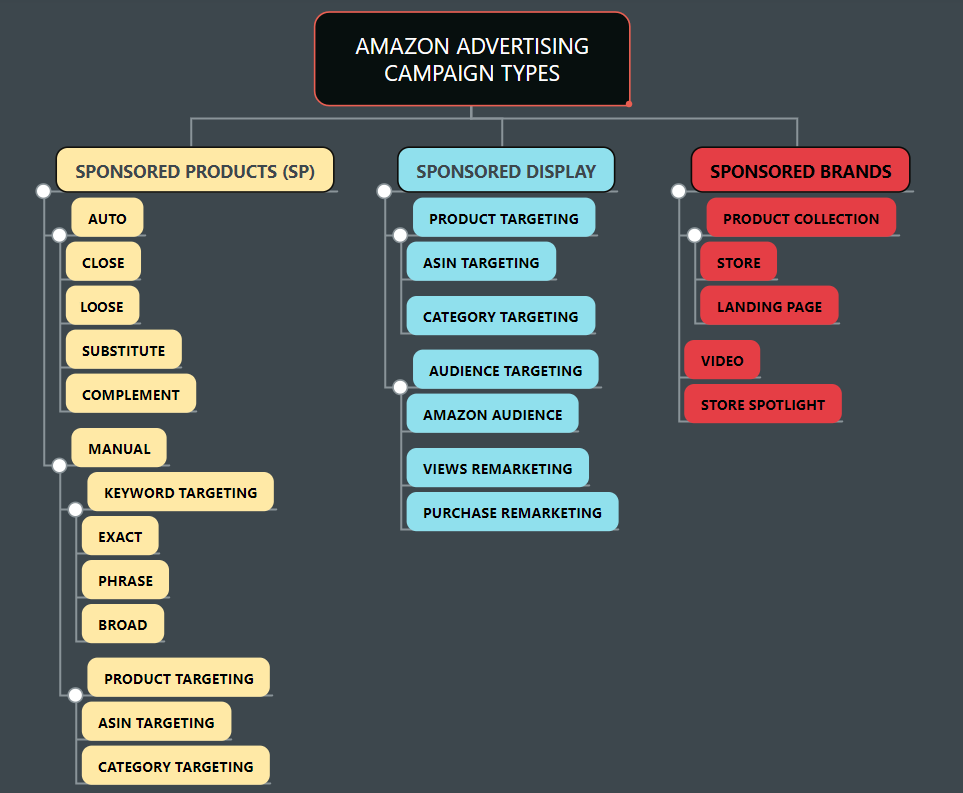
- Check out this visual aid of Advertising type breakdown (see images below)
Sponsored Products
Sponsored Products form the foundation of Amazon Advertising. They're easy, cost-effective, and quick to set up. Additionally, they often offer the lowest and most efficient cost per sale on Amazon. As a result, they are the most prevalent type of advertising, constituting a significant portion, usually ranging from 50-80%, of campaign types in an account.
A Sponsored Product campaign showcases specific products or ASINs (Amazon Standard Identification Numbers) in Amazon search results and competitor product pages. This ad type focuses on consumer search behaviors (a highly engaged audience) and follows a cost per click (CPC) payment model. You're charged only when an Amazon shopper clicks on your ad.
We will cover the details of targeting types and behaviors for this campaign type in greater detail in the course material later in this section.
Sponsored Brands
Sponsored Brands necessitate a registered brand store, approved through brand registry. Brand registry is a process covered in another section of this course.
Once approved, you can create these ads that appear even higher on the page than sponsored product advertisements — right at the top of search results — focusing on your brand as a whole.
They can highlight a product collection (three products or more), showcase your brand store (your virtual storefront on Amazon), or enable video ads. These campaigns are excellent for reinforcing brand awareness and protecting your brand presence.
Sponsored Display
Sponsored Display utilizes either cost per click (CPC) or cost per mille (CPM - cost per 1,000 viewable impressions) cost structures. It differs from sponsored product or sponsored brand campaigns in that it can be displayed to consumers both on and off Amazon.
Also unlike SP and SB product types, sponsored display allows advertisers use of 'rich shopping' and other audience targeted contextual signals to find appropriate audiences, as opposed to direct keyword or product page targeting that exists in the other 2 models.
Key Takeaways:
- The three main campaign types offered on Amazon Advertising are Sponsored Products, Sponsored Brands, and Sponsored Display
- Each campaign type has a specific use, benefits, and limitations/risks.
- Sponsored Brand requires brand registry.
- Sponsored Display targeting offers demographic targeting and audience remarketing.
- Sponsored Product and Sponsored Brand operate on CPC cost models,
- Sponsored Display makes use of both CPC and CPM (cost per mille) cost models.
Step 2: How Does Amazon PPC Work?
Summary:
In this module, we'll explore Amazon from a high-level conceptual perspective. We'll delve into what Amazon Advertising is and how it operates.
Amazon Advertising as an Auction House:
- Amazon is essentially the world's largest online auction, where sellers bid on consumer behaviors, primarily related to keywords or product searches, as opposed to traditional items like artwork or classic cars.
- These consumer search behaviors are highly valuable to Amazon sellers. They enable sellers to efficiently target potential buyers for their products.
- To remain competitive in this virtual auction house, sellers need to meticulously monitor all their bids. The goal is to identify bids that drive conversions for your products at the lowest possible cost, while maintaining competitiveness against your rivals.
https://www.youtube.com/watch?v=7NPaBlFvRYY
03 April, 2022 - How-Amazon-PPC-Works
Video Learning:
- Watch MAG's advertising director briefly explain these concepts in the video here
- How
PPC Works
Key Takeaways:
While Amazon's A9 Algorithm leverages an extensive dataset, it primarily considers two factors when determining which advertisement to display for a given consumer behavior in a specific placement.
1. Relevancy
- It refers to how closely Amazon assesses your product's relevance to what the consumer is searching for.
- It involves considering consumer behavior, competitor listings, titles, text, SEO on your listings, category data, and more to determine the optimal relevance of your ads.
2. Bid
- A bid is the amount of money you're offering or bidding on a specific consumer behavior in comparison to your competitors.
- Balancing your bid involves aligning it with your advertising budget and goals. If your budget is limited, you might need to bid lower to pace your spending. Conversely, if driving sales or conversions is the goal, a higher bid may be necessary for a better ad position and increased clicks.
Step 3: What are Sponsored Product Ads?
Summary: This module emphasizes the significance of Sponsored Product (SP) campaigns and covers the fundamentals of their application.
Image Learning:
To download the images, click the  icon on the top right of
the screen to show the attached file.
icon on the top right of
the screen to show the attached file.
To download image, click the  icon on the top right of
the screen to show the attached file.
icon on the top right of
the screen to show the attached file.
Sponsored Products
- Sponsored Products ads are displayed on Amazon, promoting specific products in shopping results and relevant product pages. Clicking on these ads directs customers to the corresponding product page. This advertising option is accessible to professional sellers and vendors.
- Sponsored Product campaigns are the most common type of ad on Amazon, mainly because of their low barrier to entry in terms of cost and ease of use. They effectively engage the audience, contributing to their popularity. Moreover, these campaigns typically yield the best cost per sale (CPS) compared to other advertising types on Amazon.
- Sponsored Product ads are prominently showcased at the top of search results, alongside or within consumer search results, and on product pages. Amazon's algorithm decides which sponsored product ads to display based on factors like ad relevance to the search term, the advertiser's bid, and the ad's past performance.
PPC FULL GUIDE - Amazon Advertising
Media:
- Please watch the PPC Full Guide on Sponsored Products campaign creation from founder Steven Pope.
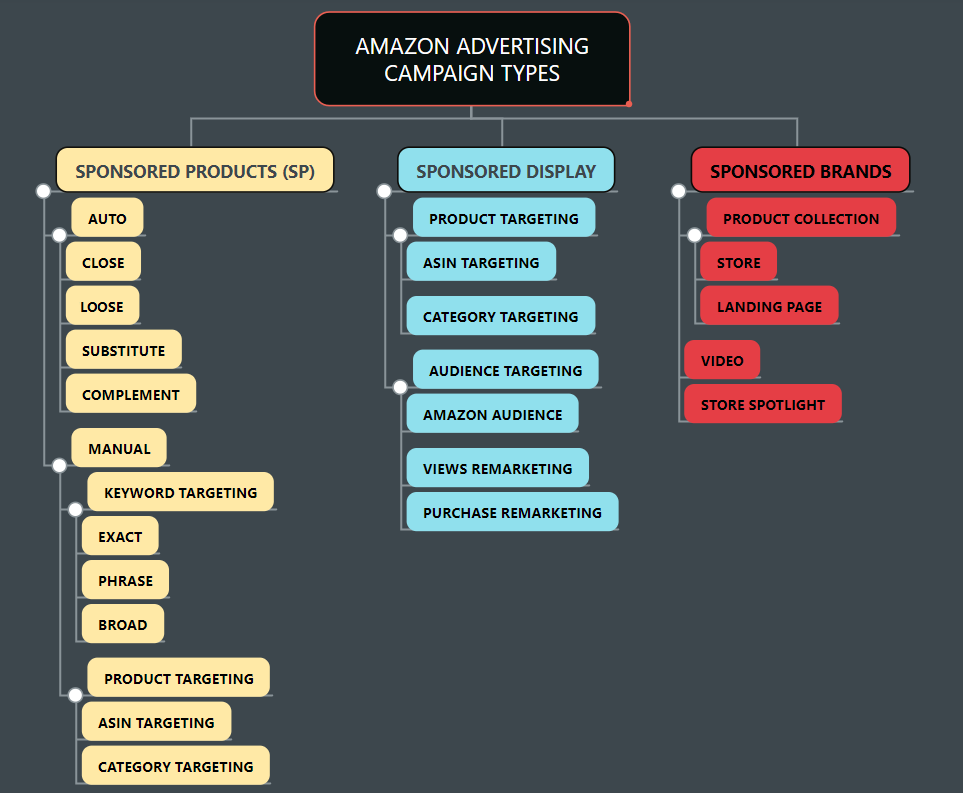
Types of Sponsored Product Campaigns:
- Auto Campaign
Amazon Auto Targeting
Loose - shows your ad to shoppers who use search terms loosely related to your products.
- Close - shows your ad to shoppers who use search terms closely related to your products.
- Substitute - shows your ad to shoppers who view the detail pages of products similar to yours
- Complement - shows your ad to shoppers who view the detail pages of products that complement your product.
- Manual Campaign
Keyword Targeting(targets the consumer's search behavior)
- Exact - Exactly matches the keyword or sequence of keywords entered by the shopper.
- Phrase - Contains the exact phrase or sequence of keywords entered by the shopper.
- Broad - Contains all the keywords in any order and includes plurals, variations and related keywords.
- Product Targeting
Product (ASIN) - Target individual products similar your products.
- Category- Target categories of products grouped by similarities.
Key Take Aways:
- Sponsored Products are the cornerstone of Amazon Advertising — highly utilized, efficient, easy, and with the lowest barrier to entry.
- Drive consumers to individual product (ASIN) pages based on consumer keyword or product search behavior.
Step 4: What are Sponsored Brand Ads?
Summary:
In this module we will cover Sponsored Brands Ad Campaigns, which require the additional step of having a 'brand registered' account on Amazon. To run Amazon Sponsored Brands, you must:
- Be brand registered
- With a patented/trademark enforceable logo
- Selling Products within an eligible category
- and have at least 3 products under the same brand (only 1 required for brand video)
Media:
- Please watch this video chapter from Steven on Sponsored Brands
- Then this video on the importance of Sponsored Brand Video
- To learn more about Sponsored Brand Store Spotlight, click here
- Learn about Brand Store Product Collections here
- More Video Learning About Sponsored Brands here
- Find out how to get a Trademark to sell on Amazonhere
Sponsored Brands:
- Sponsored Brand campaigns help sellers generate consumer awareness around their brand, utilizing customizable ads that link directly to a landing page or a brand store.
- Sponsored Brands also display prominently at the top of shopper search results, as well as in related items areas within competitor product pages.
- Uses of SB as Compared to Sponsored Product, - Sponsored Brands are generally considered more of a 'top of funnel' tool - meaning that it's better at building awareness, as compared to SP which is a mid or lower funnel type of AD type, meaning it casts a narrower net, but all things being equal will appeal to a more buy-ready audience, and therefore will convert at a higher %.
- Some important differences compared to Sponsored Products -
Structurally different - no auto campaigns, and no ability to separate out multiple ad groups
- Unlike SP, in a sponsored brand ad winning the buy box or featured offer spot isn't required to display/run your ad.
- While this is a nice feature to increase traffic/impressions, one must be wary of this feature, because it also means attributed sales include all sales of products with the same brand, whether or not that product is actually sold by you, a competitor selling the same product, or Amazon itself. This can lead to seeming inconsistencies in your advertising metrics that you must be wary of, particularly if you sell products sold by many other sellers.
- To use Amazon Sponsored Brands, you must:
be brand-registered
- have a true brand logo
- be able to ship to all US addresses
- sell products from an eligible category
- Minimum 3 products of the same brand for the Product Collection (Sponsored Brand Video is the exception)
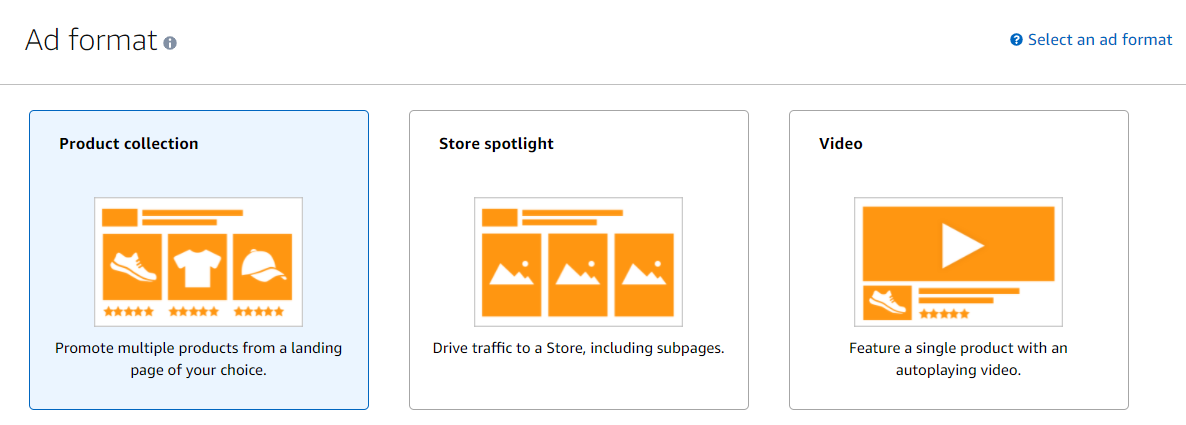
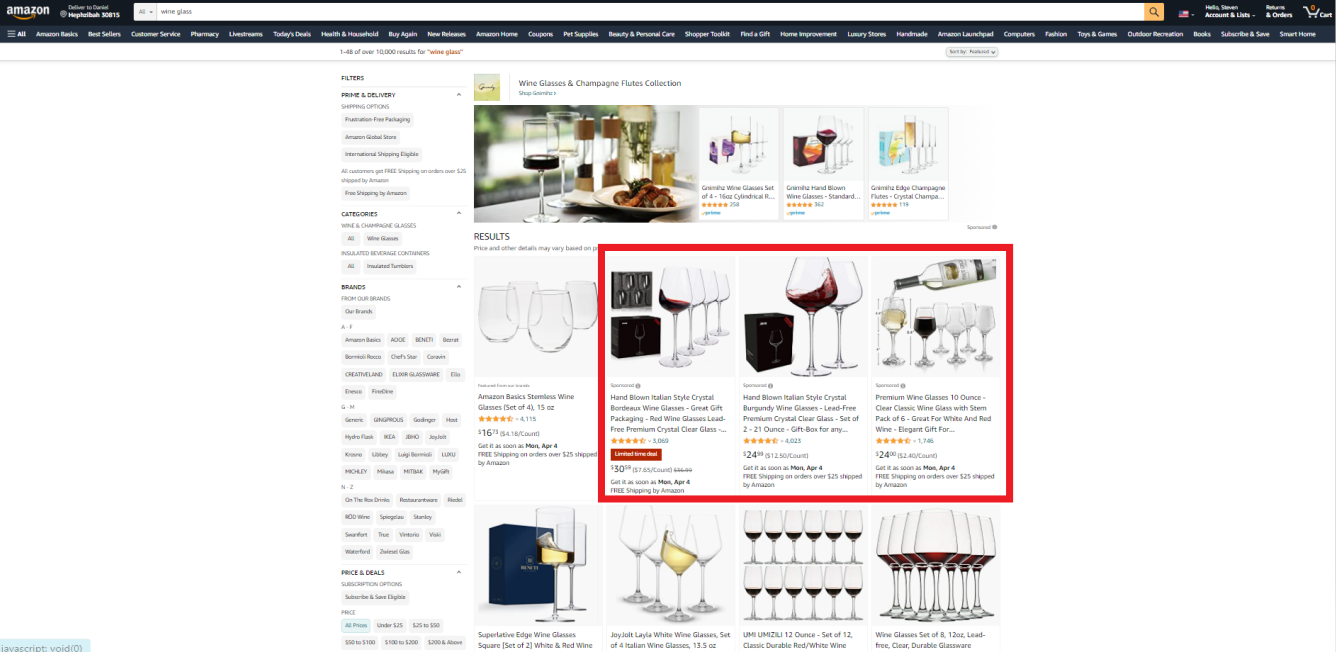
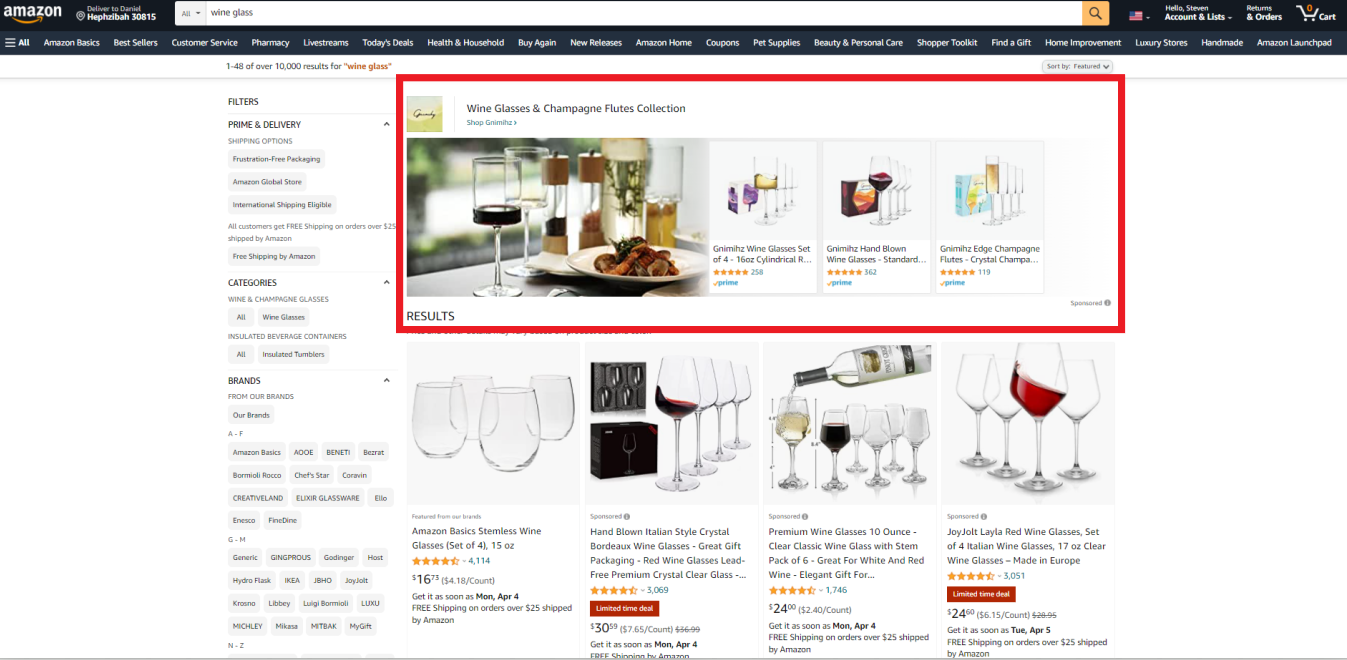
Sponsored Brands Product Collection:
- These are Amazon banner ads that generally appear at the very top of the search results. In mobile format, they may also appear at the top of a product detail page.
To download image, click the  icon on the top right of
the screen to show the attached file.
icon on the top right of
the screen to show the attached file.
- Like Sponsored Product campaigns, these campaigns make use of keyword and product search targeting to identify targets.
The Structure of a Product Collection Ad breaks down as follows:
- A Headline (Text) - consisting of a custom 50 character headline shown above your banner
- Prefabricated Landing Page - Amazon will allow you to have this ad
point the customer to 1 of 2 destinations-
They can be guided to your Amazon storefront/brand store page, OR
- You can have Amazon create a "custom" landing page, including only the bundled selections you chose for your Ad campaign. The custom landing page performs will appear like the search result page, which some feel convert better due to an uninterrupted funnel/flow.
- A headline Image - primarily for mobile use, the best image placement here is a big prominent display of the product itself.
Sponsored Brands Store Spotlight:
- Compared to Product collection, Store drives the client to your storefront/brand store page. You do not have the option to create a custom landing page with this Ad type.
- These ads primarily premier at the top of your shoppers' search result pages.
Why use sponsored brand video (SBV)?
Generally speaking, videos used for Sponsored brand video campaigns should:
- Run between 15 and 30 seconds in length (and no longer). Even at this length, you need to focus on building a narrative around your brand story to keep your audience engaged in your products.
- Include your logo and a clear call to action.
- Show your product within the first 2 seconds of run time.
- Make clear what the function of the product is within the first 5 seconds of video run time
- DON'T FORGET MOBILE! If your video is uploaded or formatted without mobile viewing in mind, it is highly probable you will create a video ad that will not run optimally on a smaller phone display. As a result, you might miss on reaching a large number of people who browse and shop in Amazon using their mobile device.
- Video and audio specifications (Source ~ Amazon.com)
Video duration
- Between 6 and 45 seconds (15-30 secs highly recommended)
- Video dimensions - 1920 x 1080, 1280 x 720 or 3840 x 2160
- File size - Less than 500MB
- File format - .MP4 or .MOV
- Aspect ratio - 16:9
- Video codec - H.264 or H.265
- Video profile - Main or Baseline
- Frame rate - 23.976fps, 24fps, 25fps, 29.97fps, 29.98fps, or 30fps
- Video bit rate - Minimum 1 Mbps
- Audio codec - PCM, AAC, or MP3
- Audio format - Stereo or mono
- Audio bit rate - Minimum 96 kbps
- Audio sample rate - Minimum 44.1khz
- Letterboxing - Videos must not have black bars on any side of the video content
- Amazon does not permit blank or black frames at the start or end of videos.
- Amazon Content Policy
In addition to format restrictions, Amazon also strictly enforces creative guidelines which your brand videos must adhere to, and a moderator will review to confirm, before your video can be published live to Amazon. It is therefore paramount that you review their policy prior to content creation in order to save wasted time and expense creating ineligible video content.
Key Takeaways:
- Sponsored Brands are a powerful tool to help you build awareness around your brand, as well as gives you an opportunity through video and other creative avenues to tell your brand story in a fuller, more effective way.
- Compared to sponsored products, Sponsored Brands is considered a more 'top of funnel' advertising type.
- Requires a brand store
- Does NOT require your products/offerings to be the featured offer/buy box winner in order to display your sponsored brand ads.
Step 5: What are Sponsored Display Ads?
Summary:
In this module we cover Sponsored Display Advertising Campaigns, its primary uses, benefits, costs and limitations, as well as its relative similarities and differences to Sponsored Product and Sponsored Brand Campaigns
Sponsored (Product) Display - What Makes it Different?
There are two (2) primary distinctions that separate Sponsored Display Advertising Campaigns from the other primary Ad structures (SP, SB).
- Sponsored Display ads enable you to reach relevant audiences browsing both on and off of Amazon.
- Sponsored Display ads don't trigger the same way as Sponsored Product and Sponsored Brand - that is to say on a keyword search when a shopper types something into the Amazon search bar.
- Unlike SP and SB campaigns, Sponsored Display works in a slightly different way, based upon past shopper behavior.
Other Differences
- Additionally, the cost model can be cost per click (CPC) like Sponsored Products or Sponsored Brands, or cost per mile (CPM) or cost per 1,000 viewable impressions (read impressions roughly as "possible page views")
- Uses auto generated creatives designed to stay in style with Amazon creative delivery.
- Like Sponsored Brands, Sponsored Display requires brand registry in order to access.
If not with Customer Search, When & How are Sponsored Display ads triggered?
SD ads display for shoppers who:
- Previously viewed your products.
- Previously purchased your products.
- Recently viewed product listings similar to yours (competitor products).
- Recently searched for product listings similar to yours.
- Recently purchased a product in the same category as yours or a category related to your product category.
Media:
- Watch My Amazon Guy Founder Steven Pope's Video Chapter about Sponsored Display Campaigns here
- Review chapter of the video where Steven covers Audience remarketing here
Key Takeaways:
- Sponsored Display ads allow you to reach shoppers on and off of Amazon.
- Unlike Sponsored Product and Brand Campaigns, Sponsored Display campaigns do not use keyword search targeting, relying instead upon audience, category and product targeting.
Step 6: Bid Strategy Management
Summary
In this module, you will learn bidding strategies are used within the campaign settings section of an advertising campaign to present how a campaign will behave concerning bidding strategy.
Bidding on Amazon
As discussed in previous modules, Amazon uses an auction-based system that allows advertisers to place bids for their ads to display to shoppers based on search and shopping behaviors exhibited by Amazon shoppers. Advertisers pay for the bids when shoppers click on their ads (unless in exceptional cases of Sponsored Display or DSP where a CPM model is also possible). This is known as cost-per-click (CPC) advertising.
For most campaign types, Amazon offers 3 general types of bidding strategies on Amazon.
NOTE: Recently Amazon began making available the 4th type of bid strategy - rule-based bidding -which will be covered at the end of this module.
But first - to the 3 standard types of bid strategies on
Amazon:
To download the image, click the  icon on the top right of
the screen to show the attached file.
icon on the top right of
the screen to show the attached file.
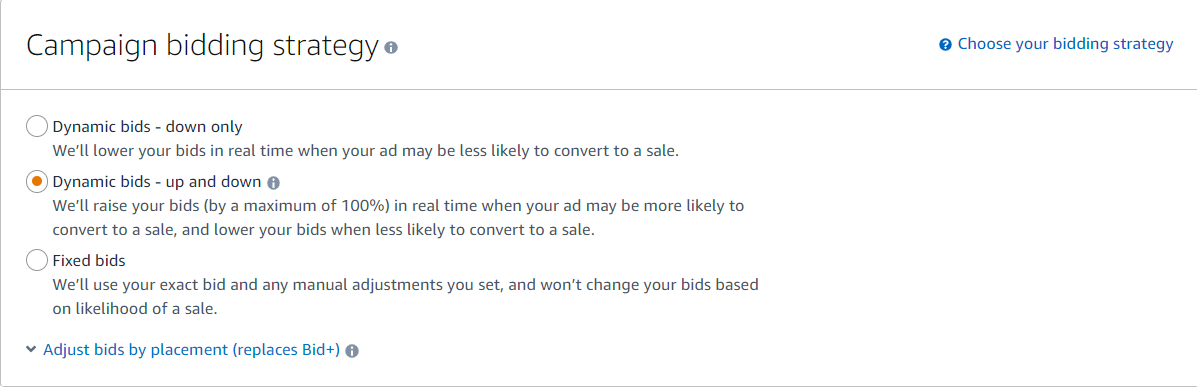
Understanding Bid Strategy
Bid strategy determines your campaign's preset behavior when placing bids on target keywords, products, or brands.
1. ‘Fixed’ Bids - As the name suggests, the bid is fixed, meaning the value of the bid doesn't change for any reason. What you see is what you get. A $1.50 bid is a $1.50 bid. On Monday. On Sunday. Buying 1 fish 2 fish, red fish blue fish. Always.
- Best times to use a fixed bidding strategy -
In a new account/campaign/product where you’re trying to generate impressions and clicks on something that doesn’t have pre-built consumer awareness or any history of traffic generation or conversion on Amazon. Fixed bids are a great way to build initial traffic in these kinds of scenarios.
- When you want to achieve hyper control on your bids. This can be for cost-controlling purposes or testing purposes.
- More controlled and efficient from a cost perspective as compared to the 'dynamic-up-and-down' bid strategy.
2. ‘Dynamic Down Only’ Bidding - This means your bid is what you said it is…until Amazon’s algorithm detects based on a variety of data points that you may be less likely to convert for a given ad (for example, a less relevant search query, or a placement that doesn’t historically perform well for your products or products like yours, etc.). In this case, you allow Amazon to lower your bid in real-time, to keep you from overbidding on low value or low relevancy traffic.
- Best times to use -
When you want to be more conservative/efficient with your bidding strategy.
- New Auto Campaigns.
- Any time you generally want to try and keep ACoS as low as possible (sometimes to the detriment of maximum traffic velocity).
3. ‘Dynamic Up and Down’ Bids - This is generally considered the most aggressive form of bid strategy. This means you give Amazon permission to automatically lower your bid for lower conversion traffic (the same as down only), but now additionally, you also give Amazon built-in permission to raise your target bid in real-time, when the data indicates that you may have an increased chance of conversion/sale. It can up your bid by as much as 100% (2x your actual bid). So in this case a $1.50 bid can be a $3.00 bid or a $.02 bid (Amazon minimum bid).
- Best times to use -
When you want to increase traffic velocity (impressions & clicks) because your data suggests the corresponding campaign/target/search term converts at an efficient rate.
- When you want to increase traffic velocity (impressions & clicks) because for your current go-to-market strategy, or this given campaign, your strategy inclines you to focus more on traffic than on being efficient (i.e. you want clicks and orders, and efficiency be darned!)
Media:
- Watch this video chapter from Ads Director Matt Davis on Bid Strategy
- Then Watch My Amazon Guy Founder briefly cover bid strategy on new accounts.
Rule Based Bidding:
Rule-based bidding allows you to manually preset bid behaviors based on performance (ACoS, RoAS). This means, that if the campaign is meeting the performance metric you've predetermined, you give the campaign automatic permission to increase those bids by a certain %. It does not currently allow you to lower bids automatically based on preset conditions in this mode, only raises them.
At such time as the campaign stops meeting those preset performance metrics, the bid will revert to its lower preset level.
Conditions Necessary to run rule-based bidding:
- Currently, rule-based bidding is only allowed on Sponsored Product (SP) campaigns.
- The campaign must have a minimum of 30 conversions in the last 30 days.
- A minimum daily budget of $10 or greater.
- Only when utilizing automatic, manual keyword, or manual product targeting.
Key Takeaways:
- Before you get to setting bids on individual target placements, you must devote time to set the bid strategy, which will determine the macro behaviors of the advertising campaign - YOU CAN NOT EFFECTIVELY GAUGE YOUR BID LEVELS if you do not first understand the bid strategy controlling a given campaign's behavior.
- Fixed bids are the best strategy for campaigns, products, and brands with little to no search or customer interaction history on Amazon.
- Dynamic up and down bidding is generally the most aggressive bid strategy.
- Dynamic down only is generally the least aggressive bid strategy.
Step 7: How to Utilize Different Match Types
Summary:
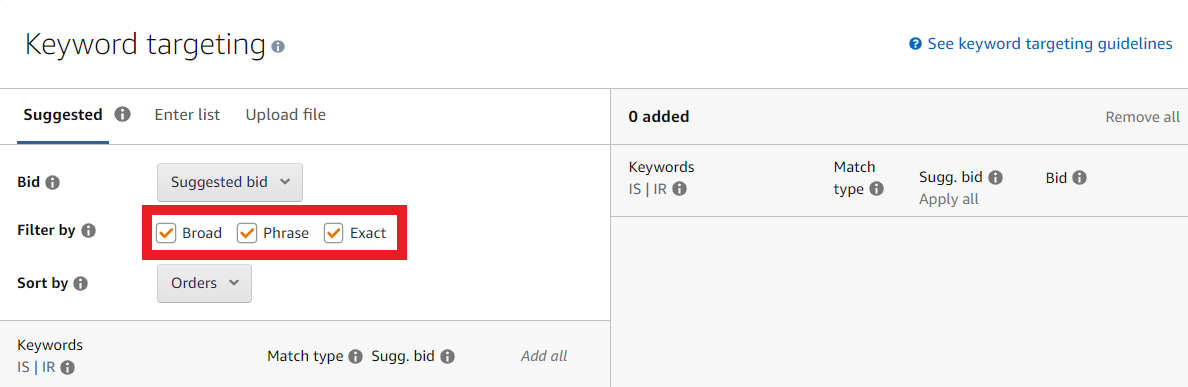
In this module, we'll explore the three Amazon keyword match types: Broad, Phrase, and Exact match.
To download image, click the  icon on the top right of
the screen to show the attached file.
icon on the top right of
the screen to show the attached file.
Media
- Watch the videos below led by our MAG PPC executive Noah Wickham and former MAG PPC Manager Orkun Duzgun to see examples illustrating the differences in meaning and application across the three match types.
Understanding Match Types and When To Use Them on Amazon
Amazon PPC: Difference between Exact, Phrase, and Broad Keyword Match Types
The 3 Keyword Match Types:
1. Exact Match-
- Exactly matches the keyword or sequence of keywords entered by the shopper.
- Generally considered the narrowest, most relevant match type.
- Due to their high relevance, exact match keywords are often the most efficient in terms of conversion percentage.
- Consequently, they are typically the most expensive match type on a cost-per-click (CPC) basis.
- The hyper specificity of exact match also gives the advertiser a greater amount of control to limit spend to only a few specific search behaviors.
2. Phrase Match- Contains the exact phrase or sequence of keywords entered by the shopper.
- Phrase match type is the middle road between exact match and broad match.
- Phrase match requires that all the given terms (words) in a keyword (shopper Amazon search term) be present and in the correct order, but given that is true,anyother term or terms may exist outside of that phrase, and it willstill bid on that behavior.
3. Broad Match
- Casts the widest net among match types.
- If all terms are present in any order, the advertising campaign bids on that search behavior.
- This includes situations where essentially any other terms exist alongside the specified ones.
Putting it Into Practice -
Sample keyword - Funny wine glasses
1. An exact keyword match type will trigger for 'funny wine glasses' but not for 'funny wine glasses for mom'.
- Exact matches can include misspellings, singulars, plurals, or apostrophes.
2. A phrase keyword match type will trigger for 'funny wine glasses' and 'funny wine glasses for mom,' but not for 'funny and silly wine glasses.' Requires the specified terms to remain intact, in proper order, but allows additional terms outside that sequence.
- Phrase matches can include misspellings, singulars or plurals, stems/roots, abbreviations, and acronyms
3. A broad keyword match type will trigger for ANY SEARCH BEHAVIOR ON EARTH where the words "funny," "wine" and "glasses" are all present. The order in which they appear does not matter. Any other terms which may appear in between, before or after these terms does not matter.
- Broad Matches can include synonyms, abbreviations, acronyms, misspellings and variations including plurals and roots/stems (e.g. fridge vs refrigerator)
Key Takeaways:
- 3 keyword match types - broad, phrase, & exact.
- Broad casts the widest net, exact the narrowest.
- Exact typically targets the most highly relevant traffic, while broad targets the least.
- Your choice of match type may involve targeting an entire tree of search terms.
Step 8: Bids By Placement
Summary:
In this module, we will cover bidding by advertising placement, which like bid strategy, is controlled in the 'settings' section of an advertising campaign

To download image, click the  icon on the top right of
the screen to show the attached file.
icon on the top right of
the screen to show the attached file.
Understanding Bids By Placement
Bidding by placement provides a new tool for bidding on Amazon. In addition to bidding on a specific search behavior (keyword or product search), placement bidding allows us to bid on the physical location on the page where we want our advertisement to appear.
Top of Search (first page)
Top of search placement gives sellers the opportunity to bid up to 900% (9x normal bid) above the default bid, in order to have our ad displayed right at the top of the first page when someone searches for a given keyword or product.
1. When to use -
- Campaigns, products and targets where you have data that shows you convert at a high %.
- In instances where a faster rate of traffic velocity (impressions) are more important for you than conversion. For example, when quickly garnering clicks and sales is more important than doing so while minimizing spending.
2. When not to use -
- New campaigns with no data.
- New products with no sales history.
- Auto campaigns in general (unless data suggests its an abnormally efficient one).
Product Pages
Product page search placement gives you the opportunity to increase your bid in a similar fashion as top of search (up to 900% increase), but instead of paying more for the right to be top of search, you pay more for the right to be the product advertisement that appears on competitor product pages of similar products and brands as your own.
- When to use
- When data suggests that your product/brand/listing converts well against many of your direct product competitors.
- When you aim to divert attention from competitors' products, even if it means a temporary loss, aligning with your broader go-to-market strategy.
Media:
- Watch this video chapter where MAG Ads Director Matt Davis discusses the finer points of bidding by placement, as well as how placement behaves with the bidding strategy you select.
https://www.youtube.com/watch?v=lTeCtSd5ieA
Key Takeaways:
- Amazon now enables you to adjust your campaign's bidding behavior, focusing on specific high-conversion advertising spaces.
- Bidding by placement is a recent addition by Amazon, providing sellers with enhanced power and control over where and how they bid.
- While bid by placement can be a potent tool for boosting Amazon sales, it requires cautious use, as it holds the potential to rapidly increase a seller's advertising spend.
PPC Campaign Launch
Step 1: Keyword Research and Segmentation
Summary
Keyword research is a pivotal aspect of the Amazon business, crucial for both SEO and PPC. Given that most Amazon PPC campaigns are centered around keywords, effectively targeting them is essential for showcasing our products, videos, or banners.
As keywords play a significant role in this business, ensuring precise and profitable keyword research is paramount for our advertising efforts. This course aims to provide you with the fundamentals of effective keyword research. Let's begin!
Media:
03 April, 2022 - Keyword-Research-and-Segmentation-v3
1. Watch MAG PPC Manager Fernando Azevedo as he walks you through the basics of Video Learning and Keyword Research.
PPC: Strikezone Keywords Tutorial - Amazon Seller Central
2. Next, delve into explore strikezone keyword harvesting with MAG Advertising Director Matt Davis. This video showcases a more advanced harvesting strategy that you can employ on the fly to identify new and profitable keyword targets.
Amazon PPC: When to Isolate Keywords to Lower ACoS
3. Also, be sure to check out MAG Founder Steven Pope's video on keyword isolation here.
Steps Required:
- Know your product that you are advertising.
- Determine your strategy.
- Decide on your budget.
- Find relevant competitor ASINs.
- Use an external tool or Amazon's brand tools to get a feel on which keywords will work best for your campaign.
- Be sure you implement SEO into your strategy.
We can do our keyword research with multiple tools.
- Helium10 - Third-Party App
- Amazon Search Reports and Brand Analytics
As of now, Helium10 is the most accurate 3rd party data provider. So we are making sure that we are basing our research on that while making sure that we are not missing anything important with the help of Amazon Search Result and Brand Analytics.
Keyword Research through Helium 10
Helium10 is an excellent tool for examining our competitors and the keywords they are currently ranking and advertising for. To outperform them in the competition, it's crucial to target the right keywords. This is where Cerebro proves to be valuable.
There are a couple of steps to make sure that we are gathering the correct keywords as our targets.
1. Find strong competitors that are direct competitors with you.
2. Collect their ASINs and do a Cerebro search.
3. Apply search filters (Below search filters can be changed according to the product and the goals.
- Ranking Competitor Count > 3-4
- Search Volume > 200
4. Export the results.
5. Apply filters and find the common keywords that most of the competitors are organically ranking.
6. Decide on your keywords and create a keyword list for your product.
Key Takeaways:
- Proper keyword research and segmentation (isolation) are vital in order to run a successful advertising campaign on Amazon.
- Keyword research involves identifying the search behaviors that have the highest relevancy, volume, and the most competitive bid rates in order to help sellers identify the most profitable search behaviors to target on Amazon.
- Failing to do this research properly before initiating Amazon advertising campaigns will result in unnecessary cost - primarily in the form of wasted ad revenue.
Step 2: Developing PPC Structure - Understanding Campaign Types
Summary:
In this module, we'll take a deeper dive into campaign type and function, to give you a stronger understanding of how different campaign types function. We'll dig into the finer points of targeting strategy in order to help you to better understand the uses, strengths, and limitations of each.
Think of Campaign types like tools in your toolbox:
Advertising Campaigns are like the various types of tools you might keep in a tool kit. No one campaign type is "better" than another, any more than the screwdriver in your toolbox is better than your hammer. A properly equipped tool kit requires both.
You should start to view the various campaign types in this fashion - each is its own tool, with its own specific purpose and intended application.
Media:
https://www.youtube.com/channel/UClUSEsDS2sdgNJfCcCM_5Uw
1. Get a basic visual walk-through of campaign structure and strategy with My Amazon Guy Sr. PPC Manager Fernando Azevedo.
PPC FULL GUIDE - Amazon Advertising
2. Watch My Amazon Guy Founder Steven Pope cover the basics of Product Selection in your ad groups (7:17-7:50)
Discovery Campaigns:
Discovery campaigns are called so, because like a survey or political poll, one of their primary functions is to learn which search behaviors convert well for your brands and products. Typically discovery campaigns focus on casting a wide net. As a result, they're often great at generating traffic, but commonly less efficient than more narrowly targeted campaign types.
The typical discovery style campaigns are:
- Auto Campaigns
- Manual Broad Match Campaigns
- Manual Phrase Match Campaigns
We will not revisit the specifics of these targeting types here, as they are covered in detail in other modules in this section, but it is important to note here that the primary reason these campaign types are all considered "discovery" campaigns, is that they all generate a search term report full of invaluable insights into the search and shopping behaviors of your customers and potential customers. Search Term Reports are an important tool in your tool kit that should not be overlooked.
Conversion Campaigns:
Conversion campaigns are designed to efficiently drive sales—these are the star campaigns that yield the highest individual ROI (return on investment) for your ad dollar. Typically, these campaigns are hyper-focused and narrowly tailored to an audience deemed highly favorable or likely to convert to a sale.
- Exact Match Test Campaigns
Manual Exact Campaigns consist of keywords with only the Exact Match Type. These keywords are exceptionally relevant to your product or brand, or they may be derived from your discovery campaigns, showing a demonstrated history of success.
- Exact Match 'Hero' Campaigns
Like the campaign type above, the structure is also manual exact keyword targeting. The primary difference for a 'hero' campaign is simply the demonstrated history of success. Hero campaigns are typically pulled from the strongest converting keywords in your entire account.
- The Fundamental difference structurally for a 'hero' campaign is the number of keyword targets within the ad group. Whereas an exact match test campaign may have up to a half dozen keywords, a 'hero' campaign will typically only have a single keyword or search behavior. The reasoning behind this is so that you can guarantee that 100% of the budget you allocate to your hero campaign goes only to that campaign search behavior/keyword, and nowhere else. This 'keyword isolation' is a strategy you will become intimately familiar with, and is a means of ensuring no wasted ad $ spent on anything but one specific behavior.
Manual Product Targeting Campaigns (Offensive)
- These are Manual Product Targeting Campaigns that advertise your product based on your competitors. These campaigns can be very wide net or very targeted, depending on whether you target a category, a brand, or individual product ASINs, and how many you target.
- There are a variety of strategies utilized to identify competitor market share to target, but most typically revolve around targeting competitors with the highest relevancy to their own products and brands.
- Advertisers will frequently target the highest-selling competitors in their category.
- When selecting competitor ASINs and brands to target, it's important
to note that it's prudent to choose brands with which you believe you
can be competitive.
That is to say - brands, products, and listings early in their life cycle will usually find more efficient success by targeting weaker brands, with lower reviews, at higher prices than their own products and brands, and much like an amateur athlete, work their way up to the more competitive ranks as their listings build a search and conversion history on Amazon.
Manual Product Target Campaigns (Defensive)
- These are Manual Product Targeting Campaigns, only rather than targeting your competitor's brands and products, you target your own products.
- Why spend your hard-earned money on advertising against your own listings? The answer is simple—to ensure others can't do it first! The concept behind defensive ad spend is to decrease the supply of advertising space on your listings, making it more expensive for potential competitors who might attempt to advertise on your listings and divert customer traffic from your products and brands.
Defensive spending raises the cost of such endeavors.
- This is a particularly valuable strategy for brands that already have strong consumer awareness within their category or brand space. It involves using your other products to advertise against your primary product. In effect, this strategy seeks to occupy as much real estate as possible on paid ad spaces, as ad space on Amazon truly is a zero-sum game.
Key Takeaways:
- When developing your PPC Structure. you should consider having Discovery Campaigns, Winners' Campaigns, Heroes' Campaigns, Product Targeting Attack Campaigns, and Product Targeting Defense Campaigns.
- Like tools in a toolkit, each campaign type has its specific use and function, whether it's driving awareness, defending brand real estate, conducting shopper research, or driving efficient sales.
Step 3: Bid Types and Management
Summary:
In this module, you will learn how to responsibly set and manage your bids across your advertising campaigns. Mastering the art of setting and adjusting bids is crucial for maintaining efficient ad spend.
Media:
- Watch Ads Director Matt Davis briefly cover the beginning bid strategy here
- Watch MAG Founder Steven Pope talk about bids on a new campaign here
Why Do We Need to Adjust Bids?
- Bid Adjustments are the best way to control ACoS
What you now must understand about bid strategy is that bid adjustments are the primary/preferred method of controlling the efficiency of a given keyword or product target.
- By raising or lowering a bid, we can speed up or slow down the velocity of traffic by making our bids more or less attractive to the auction. In effect, all other variables being equal, lowering a bid will likely have the impact of slowing the rate of impressions and clicks, but improving efficiency/ACoS.
- The inverse is true of raising a bid - all else being equal, raising a bid will usually speed up the velocity of impressions and clicks, but will also drive up ACoS. Is this always true? No. In advertising, very rarely is something always true. Think of this as a strong probability.
What about Negative Keywords/Pausing/Negations?
- Negations and negative targets are also covered elsewhere in this section, and while those are important tools for controlling wasted spend, bid adjustments are preferred to negations because bid adjustments still allow you to continue to index-that is to say acquire traffic and engagement (clicks) surrounding that search behavior.
- Pausing or negating, conversely, kills the bid entirely (known as
archiving). While it is easy enough to unarchive a keyword, in practice,
it rarely happens. Most of the time, when you negate something, you end
the campaign's ability to ever target that behavior again.
Think of the analogy of an infection - while both methods will work, antibiotics are preferable to amputation.
Points of Strategy - Safer to Start Small
1. Especially when discussing products, listings, and brands new to Amazon, or with little to no sales history on Amazon, many people call this "the honeymoon period" on Amazon. A time when (supposedly) Amazon is nice to new sellers by inordinately favoring them in search results for the first 2-6 weeks, depending on which expert you ask.2. While the purpose of this text is not to argue for or against this concept, what is not in dispute is Amazon's A9 algorithm is a 'learning' algorithm, meaning it will get smarter over time, as your listings, products, and brands have an opportunity to interact with you. How the consumer behaves will allow Amazon to 'get to know' your products so to speak.3. This means early on, Amazon isn't very smart when it comes to properly placing your ads in front of the most relevant, most likely to convert traffic.
- When sellers decide to start with a more aggressive initial bid strategy (from the suggested bid to the high bid or beyond), you can lose control of the spending, spend more than you imagined and test the product too fast, dragging down your conversion percentage, wasting your money, and actually negatively impacting the coveted organic indexing all sellers are trying for.
4. It is, therefore, prudent when creating new campaigns without history to utilize a more conservative bid. If the bid is too low, the campaign won't receive enough traffic. However, it's safer to start slow and then gradually increase, rather than the inverse.
OK, you convinced me to not max bid everything, but how do I even know what's 'aggressive' or 'conservative' when placing my bids?
Follow The Signs
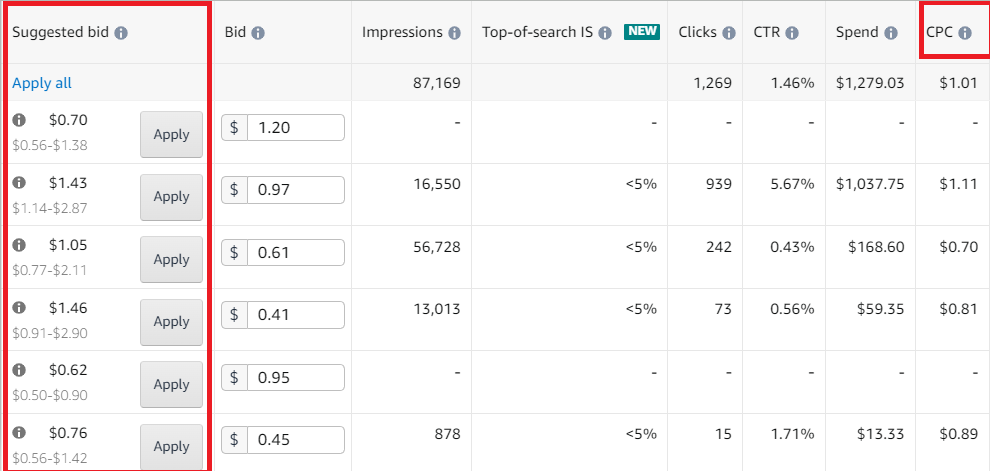
There are effectively 4 primary data points which will help you determine how conservative or aggressive your bid is in comparison with your competition, and the wider market on Amazon.
1. Amazon Suggested Bid - As the term implies, in most campaign types on Amazon, Amazon will provide you with a "suggested bid," which is the amount Amazon believes will position you competitively to win your fair share of bids. This number is determined by the current level of competition in search behavior on Amazon.2. Suggested Bid Range - Beneath Amazon's suggested amount, it will give you a range, representing the minimum and maximum ranges competitors have won bids on the given search behavior. This will give you a sense of where the market is at right now, and what other advertisers have averaged paying (roughly - important to take this metric as a range rather than a firm data set)3. Cost Per Click (CPC) -
Our old friend CPC serves as an important counterpoint, acting as a watermark against the other two metrics mentioned above. Unlike the other two, CPC does not seek to measure the marketplace at large. Instead, it looks directly at your specific product, ad group, campaign, and targeting behavior. CPC is determined simply by dividing the total amount you've spent by the number of clicks it took to get there.
Reviewing your CPC will show you how much you've actually been paying for each click and how that amount compares to the bid you're currently offering. This analysis quickly reveals whether you are currently overly conservative or aggressive. Consequently, it helps you decide whether to raise or lower your bids when reviewing your ACoS.
- Note: Like any other dataset, as it grows larger, the data becomes more reliable (all other things being equal). This means that the higher the number of clicks, the more reliable the CPC metric is.
4. Advertising Cost of Sale (ACoS) - In earlier modules in this section, we learned that ACoS is the primary metric advertisers look at to determine the relative performance of their advertising campaigns. Because this is true, we must know our ACoS before we can know if we want to be more or less aggressive with a given bid.
So now that you know the why and the how of controlling your bids, where to start?
- MAG advertising typically leans toward a more conservative bidding strategy for new campaigns with no history of engagement. This approach is motivated by the need to control costs until the algorithm has had a chance to learn about the product or brand you're advertising, as mentioned earlier.
- By initiating targets at 10-20% below the low end of the suggested bid range, you reduce the risk of unnecessary wasted spend in the early stages of the campaign when the algorithm is still learning about your products. Although you may not receive significant traffic initially, it's simple to incrementally increase the bids until data starts to accumulate.
Key Takeaways:
- Setting your bid strategy is among the most crucial tasks for an advertiser in managing their ad spend.
- Adjusting bids up or down stands out as the preferred and primary method for controlling ACoS in most campaign types available on Amazon.
- To determine the appropriate adjustments needed to a bid, it's advisable to use a combination of the suggested bid, the suggested bid range, the target CPC, and ACoS in conjunction with one another.
Step 4: Search Term Reports
Summary:
The search term report helps us to find out the keywords that Amazon customers search for when buying a product on the Amazon marketplace. The data gleaned from the STR is useful to identify long-tail keywords and non-converting searches which can be negated. Keyword harvesting and negation are the two main benefits that the STR can provide us. This course will allow us to deep dive into the value of the STR, and show you how to utilize it. Let's get started!
Media:
How to Negate
bad Search Terms on Amazon PPC Advertising to Improve ACOS
1. Watch Steven Pope discuss how to reduce ACOS using negations here.
https://www.youtube.com/watch?v=3XWKdZKvpwc
04 April, 2022 - Search-Term-Report-Converted
3. Watch our PPC Manager Orkun speak to the STR here.
Which campaign types can utilize the STR?
- Manual broad and phrase match campaigns
- Automatic campaigns
- Brand Campaigns
- Category Targeting Campaigns
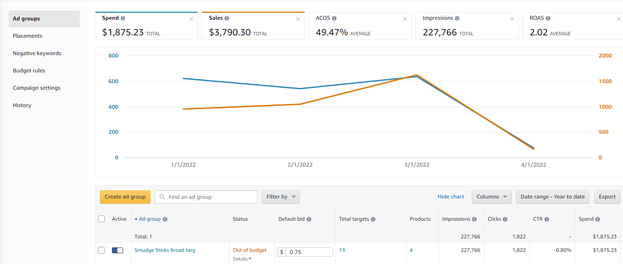
Note: The STR can be utilized only on the ad group level.
Where to Obtain the Search Term Report:
- Amazon Ad Group Console
- Amazon Advertising Reporting
To download image, click the  icon on the top right of
the screen to show the attached file.
icon on the top right of
the screen to show the attached file.
To download image, click the  icon on the top right of
the screen to show the attached file.
icon on the top right of
the screen to show the attached file.
Key Takeaways:
- The STR is a valuable tool in locating converting search terms, which can be a lower cost.
- It is also a valuable tool in indicating irrelevant or high-cost terms which should be negated. (Especially in automatic campaigns)
- Every Amazon seller should utilize these reports on a routine basis to maximize PPC performance within their campaigns.
- There is no need to negate any keywords in an exact match campaign.
Step 5: The Value of Amazon Advertising Reports in PPC Management
Summary:
Amazon provides a plethora of data in its PPC reporting section. This module will allow you to learn about the most common type of reports, and how to properly utilize them to glean valuable data regarding your campaigns and to make informed decisions. Let's get started!
How to Find Amazon PPC Reports:
- Login to Seller Central
- Navigate to Reports → Advertising Reports or Advertising → Campaign Manager → Measurement and Reporting → Reports
Next, follow these steps to download the report you need:
1. Click the “Create Report” button
2. Choose among the Report Categories
- Options: Sponsored Products, Sponsored Brands, Sponsored Brand Videos, Sponsored Display, and Amazon Attributions
3. Choose among the Report types
- Options: Search term, Targeting, Advertised Product, Campaign, Budget, Placement, Purchased Product, Performance Over Time, Search Term Impression Share
4. Choose a Time unit
Options: Summary and Daily
5. Select a date range for the Report Period
6. Edit the Name in the Reporting Settings field
7. Click the “Run report” button
Optional: You can request to send the report to your mail and you can schedule them (e.g. Now, Future, Recurring) → Click the “Schedule report” button.
Advertising Reports:
As a refresher, you can have three different types of advertising: Sponsored products, Sponsored Brand, and Sponsored Display.
Amazon provides you with many reports that are in five categories: Sponsored Products, Sponsored Brands, Sponsored Brand Videos, Sponsored Display, and Amazon Attributions. All of these categories have many reports inside each category.
- Sponsored Products Reports
This includes nine different reports: Search terms, Targeting, Advertised Product, Campaign, Budget, Placement, Purchased Product, Performance Over Time, and Search Term Impression Share.
- Sponsored Brands
This includes seven different reports: Keyword, Keyword Placement, Campaign, Campaign Placement, Search Term, Search Term Impression Share, and Category Benchmark.
- Sponsored Brands Videos
This includes four different reports: Keyword, Campaign, Campaign Placement, and Search Term.
- Sponsored Display
This includes four different reports: Keyword, Campaign, Campaign Placement, and Search Term.
- Amazon Attribution
This is the newest category in the reports that provides analytics that gives information about how their non-Amazon channels are performing on Amazon.
- This includes eight different reports: Channel Publisher, Campaign, Keyword or Creative, Promoted Product, Promoted Product (Rollup), Brand Halo Product, Brand Halo Product (Rollup), and Brand Halo Snapshot.
How to Utilize:
- Each report type has a different function, which is explained clearly by Amazon.
Report Type Explanations:
- STR reports allow you to see which search terms customers have searched, and which have converted for your products
- Advertised product reports show which ASINs are in which campaign group
- Targeting reports show what keywords or product targets are being targeted in your campaigns
- Impression share reports show the campaigns which gather the most impressions and can help show search volume for keywords
- Budget reports show how your campaigns fare against the daily or overall campaign caps on the account, and also what Amazon recommends your budget to be.
Note: There are other reports, but the descriptions above mention some of the most commonly used.
Key Takeaways:
- Amazon provides you with reports to help you examine the data and metrics, to make informed decisions regarding your PPC campaigns and their management and optimization.
Step 6: Bulk Operations
Summary:
In this module, you'll learn how to effectively use the bulk operations sheet. Bulk operation is a powerful tool used to make multiple changes at scale on an advertising campaign in a short amount of time. This type of adjustment is most valuable for accounts with a large number of campaigns. For new or small sellers, this might be a bit superfluous or unnecessary, however effective use of bulk operations are vital in order to effectively manage a large advertising account.
Media:
1. Follow My Amazon Guy's Sr. PPC Manager (and Expert of all things bulk ops) through a detailed demonstrationon how to properly make use of the powerful bulk uploads tool.
What are Bulk Operations?:
Bulk Operations is just a fancy way of saying "a big excel spreadsheet I can upload all my advertising changes on at once." It's effectively a specially formatted .csv file which allows you to see your advertising data from a macro perspective, and make sweeping changes across an entire account based on preset parameters.
Where to find Bulk Operations:
- Advertising → Campaign Manager
- Sponsored Ads → Bulk Operations
- You will have two formats to select: legacy spreadsheet format or new spreadsheet format [BETA].
- In the video, we select the new spreadsheet format [BETA].
- Select the date range and click on download.
- A .xlsx file will be downloaded, and then you can start using the bulk operations.
Do I have to use bulk operations?:
For small accounts it may be unnecessary, but it really is a must for larger accounts. There simply isn't a time effective way to manually adjust hundreds or thousands of individual keyword bids. Bulk files are invaluable in helping you save time by allowing you to make simultaneous changes to hundreds of keywords and adjusting bids and budgets at scale.
Key Takeaways:
- Bulk Operations are a vital tool in any advertiser's tool belt if they wish to effectively and responsibly manage large accounts.
- It's power is in allowing the advertiser to make bid adjustments, create or optimize campaigns at scale, based on a series of rules the advertiser sets.
Bonus Content
Upcoming Amazon Feature - Sponsored Video Ads
What is SPV (Sponsored Video Ads)?
A new feature called "Sponsored Video Ads" has been announced in the Unboxed conference which featured a new ad format that allows advertisers to upload 1-5 product feature videos per product, paired with descriptive text for each feature.
Amazon Announcement link: https://advertising.amazon.com/resources/whats-new/unboxed-2025-sponsored-products-video?isSSO=true
But, is this a good addition from Amazon? Or is it another feature that Amazon is against its sellers? Let's find out in this video from Steven Pope.
Amazon PPC Launching Sponsored Video Ads - Announced at Amazon Unboxed
ACoS Reduction Strategies
Strategy 1: How to Monitor Relevancy
Summary:
In this course, we will be explaining the importance of the relevancy of keyword targeting to the brand target and personality. You will learn the different metrics, and tips and tricks to learn how to best maintain relevant profitable keywords! Let's get started.
What is Relevancy?
Relevancy is a metric that we check on Amazon. We always make sure that the keyword that we are targeting matches the product that we are selling. We need to search Amazon for our keywords to see if the current search results are relevant to our product or not. This allows us to eliminate any irrelevant and potentially wasted spend on our ad account while keeping the conversion rate healthy.
Video Learning:
03 April, 2022 - ACOS-Reduction-Strategies---Strategy-1---Revelancy-Converted
The connection between relevancy and ACoS
When people are thinking about relevancy, they usually don't think that it is actually affecting the ad performance directly.
Example:
So imagine that our product is a wine glass for moms and there are wordings about being a mom on it. Suppose we are targeting this product as "wine glass" versus "mom gift" or "mom wine glass". Even though wine glass is a relevant keyword it is not going to be as efficient as mom gifts or mom wine glass keywords.
This is where relevancy plays a huge part. If you search for wine glasses on Amazon you will realize that most of the products are basic wine glasses without any funny quotes about being a mom or being a dad. So we can actually see that even though we are selling a wine glass, the relevance is not there.
Take Away: Targeting our product with more specific keywords will actually be more relevant, thus giving us a better ads performance and better ACoS.
How to Monitor Relevancy:
There are two different ways to check the relevancy:
- Method 1: Understanding brand personality and product understanding.
- Method 2: Monitoring CTR and CVR.
Method 1:
- For each keyword target, we can search for the keyword in the Amazon search bar and see what results come out. Then we can compare the search results with the product that we are selling. We want to make sure that the results are similar to our product. This is the first step to do a basic relevance of Jack and this is the manual and a free way of doing that.
- Understand what the product is. Check the website, and understand the target. If you have a 12 pack of red roses, you will want to understand who buys red roses, the significance of color and number in roses, any holiday considerations (valentines), and then target your keywords accordingly in different structures.
Method 2:
- The second way to check the relevancy is one based on the numbers and metrics, and acting upon what existing data is telling us (from active live ads).
- The most relevant KPIs are CTR and CVR.
CTR: (Click through rate)- Equates to the number of impressions (displays) to the ad that converts into a click. If a seller gets impressions for a keyword but receives little to no clicks, this usually means that we are having a low click-through rate and our product is not fully relevant to the keywords that are being searched by the customer. Other issues affecting the CTR can be, pricing, main image, etc, but this is still a very helpful metric in determining relevance.
- CVR: (Conversion Rate) - Conversion rate essentially compares the number of clicks you receive on an ad versus the conversion into a sale. Issues on conversion can indicate a variety of issues, including irrelevant keywords in your PPC campaigns.
Key Takeaways:
- Product understanding and thought are instrumental when choosing keywords to target against a product.
- Manual review and KPI metrics provided by Amazon are two important strategies in terms of understanding relevancy and conversion on Amazon, in relation to PPC.
Strategy 2: Utilization of Search Term Reports and Negations for ACOS Reduction and Keyword Harvesting
Summary
In the section, we're going deeper with search term reports. You already know how to find search term reports, how to download them, and what data to look for in profitable ad campaigns, but in this course, we will go deeper into why.
Media
- Follow along with My Amazon Guy's former PPC Manager Orkun Duzgun as he explains his process for ACOS Reduction Strategies - Strategy 2 - Utilization of Search Term Reports and Negations.
Reasons to Use Negations When Reducing ACoS
Without rare exceptions, there are (again generally speaking) only 3 reasons to use negations (to negative target) a customer search behavior in one of our campaigns:
- When you find keywords or search behaviors that are spending but not converting (generally 15-20 clicks or more on a given keyword with 0 sales).
- When a seasonal or temporary target goes out of season.
- When the search behavior or keyword is not relevant for our advertisement, product, or brand.
Harvesting/Keyword Isolation
The inverse of reducing or negating places where we don't spend efficiently is identifying those places we do convert efficiently, and isolating those behaviors away from their less effective peers so that we can ensure that all the intended amount of $ spend goes to that identified efficient target and that target only.
- If you think of the analogy of a garden, everything we're doing here is designed to water the tomatoes and starve the weeds.
- In order to identify "winning" targets to harvest, look for keywords with multiple successful orders (2+) that convert at or below your target ACoS.
Search Term Report Excel
There are two ways to check the search term report. One being at Ads Console and the other being the reports tab. We can download the search term report as Excel and work in bulk. This might make your life easier if you are familiar with Excel, formulas, and filters.
Key Takeaways:
- Utilizing search term reports help to analyze your campaigns is a vital step in identifying where you should spend more and where you should spend less inside a given account, campaign, ad group, or targeting behavior.
Strategy 3: Scalable Bid Management
Summary
In this module, you'll learn about scalable bid management to reduce ACOS.
Media
ACOS Reduction Strategies - Strategy-3 - Scalable - Bid - Management
Lowering the bids on worst-performing targets
First, sort the Spend and check the highest spenders. Starting from the top spending targets, identify each target running above your target ACoS, and lower those bids proportionately to how hard a change you want to put on the efficiency, and what you're willing to sacrifice in terms of traffic generation.
Increasing the bids on high-converting targets
Identify targets with multiple conversions (2 or more) that are below your target ACoS and raise their bids in proportion to how aggressive you're willing to be, and how much efficiency you're willing to risk.
Testing no impression keywords
Check the lifetime date range and identify targets with extremely low impressions. Increase the bids on these targets by a minimum of 10-15% to test and see if bid competitiveness is the driver behind the lack of impressions.
Adding new keywords using harvesting and keyword research
As you identify efficiently converting keywords/targets, isolate them, raise their bids, and allocate larger budgets to them. If you can manage to do this effectively over time, the percentage of your spend going to unprofitable places will gradually decrease, and your return on ad spend will gradually increase.
There are a couple of ways to achieve the above actions. We can either do it manually with the targeting tab or use the bulk sheet.
Manual for each campaign
- Manually check each target on each campaign in the Advertising Console, both the high-converting ones and the worst-performing ones.
Targeting Tab
- The targeting tab is a great tool provided by Amazon.
- To use scalable bid management, go to the targeting tab. Here, you'll find all the targeting keywords in your Advertising Console across all campaigns.
- Check based on recent data (e.g.: January 2022-March 2022), filter the ACoS with less than or equal to 20%, or depending on your ACoS target, increase the bids strategically on the converting targets (this will depend on how aggressive you are).
- We can also do this vice versa, filter the ACoS with greater than or equal to 80%, and Orders less than or equal to 2. This way, we will just find the targets that are higher than 80% but the orders are less than 2. You may change the bids one by one manually, or you may also do bulk actions. Decrease the bids by your preference.
- Note: Be careful when checking with Sponsored Display, it is buggy on the Sponsored Display Campaigns as of now.
Key Takeaways
- Scalable bid management is the process of identifying the most relevant keywords, increasing bids, while lowering bids on the least relevant keywords. It also involves identifying opportunities to increase bids for low-impression keywords and harvesting the most relevant among them.
Amazon Demand Side Platform
Step 1: DSP vs. Display - What's the difference?
Summary:
In this module, we will take a broad view of Sponsored Display vs Demand-Side Platform (DSP), aiming to understand the basics of each and the general differences between the two targeting types.
DSP + Display - Next Frontier in Amazon Advertising
First let's look at what these 2 advertising types have in common (i.e. why we placed them together in this module).
- DSP and Sponsored Display are two types of advertising campaigns that allow sellers to advertise both on and off Amazon, reaching third-party platforms, apps, smart TVs, etc.
- Both Sponsored Display and DSP ad types make use of a different cost structure than the traditional pay-per-click (PPC) structure prevalent in most Amazon ad campaign types.
- Both are generally considered mid to top-of-funnel targeting types, designed to build awareness and engagement. They are generally less targeted and, thereby, less efficient than more traditional advertising campaign types.
- Both allow some control over creative customization and provide greater insight into customer behavior on and off Amazon.
So now that we've got that out of the way, what are the primary differences, and which one is better?
Media:
- Review My Amazon Guy Founder Steven Pope's video chapter on Sponsored Display.
- Follow My Amazon Guy Founder Steven Pope's walk through ofAdvertising DSP (Demand-Side Platform) here.
Key Differences between Sponsored Display (SD) & Demand-Side Platform(DSP)
1. Eligibility - One of the largest differences between the 2 is eligibility.
- Sponsored Display has essentially the same barriers to entry as Sponsored Brand. Like other traditional primary campaign structures, Sponsored Display can be started with an investment as little as $1.
- DSP, by contrast, has a considerably higher bar to entry. Access to DSP must be requested from Amazon and is typically limited to sellers who spend a minimum of $10,000 monthly in self-managed ad spend, or $35,000 monthly ad spend if they're utilizing DSP through Amazon Managed Services DSP.
2. Cost Structure
- Sponsored Display makes use of primarily traditional CPC cost structure.
- DSP makes use of a CPM or cost per mile cost structure. You can read CPM to mean 1,000 viewable impressions (1,000 possible views of your ad).
2. Creative Control
- DSP allows the advertiser full creative control, including customizable headlines, custom images, and logo/brand placements.
- Sponsored Display does allow some limited customized creative but is far more restricted compared to DSP.
4. Drive Traffic Off Amazon
- DSP allows sellers the additional perk of driving traffic from an Amazon advertisement to their personal or business website rather than an Amazon PDP/landing page. This means, effectively, that advertisers can make use of Amazon advertising without even creating an Amazon listing. For Sponsored Display, all advertising traffic is driven directly to the Amazon product listing.
5. Metrics
- Customer data insights are more robust with DSP than Sponsored Display.
Key Takeaways:
- Sponsored Display and DSP are the 2 campaign types that allow for audience and remarketing targeting.
- Both can advertise to customers on and off Amazon.
- DSP has more robust customization, control, and metrics.
- Display is a much lower barrier/cost to entry.
- Both are great tools to drive awareness.
- DSP allows for greater creative control.
- DSP allows traffic to be driven off Amazon.
- DSP requires a large minimum Ad Spend.
Step 2: DSP - A Closer Look
Summary:
In this module, we will take a deeper dive into Amazon Demand Side Platform (DSP) advertising—exploring who can use it, what it's best used for, and understanding its benefits and limitations.
What is Amazon DSP?
Amazon Demand Side Platform ad buying or DSP, allows you to reach new and existing audiences on and off Amazon through purchasing of video, audio, and display ads at scale, to drive Amazon traffic to your own website, to customize your ads, and to make use of Amazon's advanced audience and remarketing data.
Media:
Advertising DSP (Demand-Side Platform) is Programmatic Ads Off and On Amazon: Retargeting +
- Watch this brief video tutorial on Amazon DSP from My Amazon Guy Founder Steven Pope.
How is it Used?
Generally speaking, Amazon DSP is primarily meant to be a driver of brand awareness. It's closer to a 'top of funnel' or wider net advertising product type, meaning that it caters to a wider (and thereby definition less engaged) audience.
How Does it Work?
DSP is designed for larger brands who want to purchase their traffic (based on cost per page view) from distributors at scale, based on audience, remarketing and interest, or other programmatic data sets.
Minimum Spend Level:
DSP advertising requires a minimum of $10,000 monthly spend in self managed spend or $35,000 monthly spend in managed service by AMS (Amazon Managed Services).
Unique Data Access
- First Party Insights - One of the benefits to DSP advertising is it gives the seller access to Amazon First Party insights...what Amazon feels is its best consumer data, collected from billions of observed customer behaviors.
- Allows the use of Pixels to examine Amazon audiences, a 3rd party audience, or their own.
- Unique data sets include metrics not available elsewhere on Amazon, including add to cart rate, video completion rate, and total purchases, to name a few.
Key Takeaways:
- Amazon DSP it's a powerful tool designed for commercial scale sellers to build brand awareness by systemically buying traffic share from distributors at scale.
- Traffic from Amazon DSP can be run to a traditional Amazon PDP, or off Amazon to your own website page.
Issue 1: Suspensions
Summary
In this module, you will learn some of the common reasons why your ad campaigns may become suppressed or suspended.
Media
Follow MAG Sr. Manager Fernando Azevedo as he guides us through how to identify and solve advertising campaign suppressions.
Sponsored Ads Guidelines and Acceptance Policies
In this link(https://advertising.amazon.com/resources/ad-policy/sponsored-ads-policies), you will be able to see the guidelines and policies to create ads on Amazon. (Source: Amazon.com)
Restricted products are Alcohol and alcohol-related products, Art and Industrial Supplies, Beauty Products, Home-test kits, Infant and Baby Products, Knives, Pharmaceuticals and healthcare, Religious products, and Sexual wellness. These are the categories that can cause the most problems.
In case you are not able to understand the issue or fix it, you can always open a Support Ticket on Amazon Seller Central. Be persistent with the case as you may get many answers that don't make sense and don't fix the problem.
Key Takeaways:
- Advertisements can become suppressed or suspended for a variety of reasons, and one should carefully review Amazon terms of service in order to ensure their ads operate within Amazon guidelines in order to prevent a suppression.
- If you notice a campaign not getting impressions for some reason but still shows as delivering, first check to see if your bids are too low. Increase the bids slowly if they are not even getting impressions.
- Next, check the product page and the product edit page; you can get clues about what the problem is. Also, open a Support Ticket and be persistent until you can find an answer that solves the issue.
Issue 2: Hidden Suppressions
Summary
In this module, we will troubleshoot issues with displaying ads that are not obvious (often referred to as hidden suppressions).
Media:
Follow along with MAG Senior PPC Manager Fernando Azevedo here.
How to fix this problem
If you note that some of your ads are not working, you should check the following:
- Check if the bids are too low, you can increase bids slowly if the targets are not getting impressions.
- Click on the product and check if it is visible on Amazon for the customers.
- Go to the Inventory page, search for the product, and click on Edit. Once you see the Edit page, make sure that there are no warnings with mistakes that you should fix. Once you fix the mistakes, you can save the changes and wait for them to take effect.
- If the problem persists, click on Help and open a case with Seller Support. It may take several responses and replies until Amazon understands the problem and takes action to fix it. Be persistent.
Key Takeaways
- It's possible to have ads stop delivering without Amazon notifying the seller or otherwise making it apparent in any place where seller might reasonably discern.
- If you notice a campaign not getting impressions for some reason but still shows as delivering, first check to see if your bids are too low. Increase the bids slowly if they are not even getting impressions.
- Next, check the product page and the product edit page; you can get clues about what the problem is. Also, open a Support Ticket and be persistent until you can find an answer that solves the issue.
Issue 3: SKU Level Selection Issues
Summary:
In this module we will cover how to troubleshoot SKU/product level selection and delivery issues.
Media:
Watch MAG Sr. PPC Manager Fernando Azevedo walk you through the steps of how to troubleshoot which SKUs to target in your product selection, and how to ensure you're only advertising eligible products.
Problem We're Solving:
Inside your campaigns, you can target many products at once, down to variants of size or color of the same product. Some of these products can have active ads, while others may become ineligible. How do you know if you're selecting the right products from your catalog to advertise? Why is that ad for my blue shirt getting impressions, but the same shirt in red is not? Identifying problems with product selection and how to most efficiently select the correct SKUs to advertise is the purpose of this lesson.
Instructions and General Guidelines:
- If you note that one of these products is ineligible, you should take the steps in the previous videos to fix the issue.
- If however, some of the products seem active and are not getting any impressions, you should experiment with creating separate campaigns for each one of the products that are not getting impressions.
- Amazon can choose the most relevant products that are fit for the ads. It can choose a model or color that performs better on a specific keyword, and that's why Amazon may prefer one product over the other.
Key Takeaway:
- If you are marketing multiple products in a campaign and some of them are not being displayed, consider creating separate campaigns for each of the products that are not getting impressions.
Bonus Content
PPC Tips
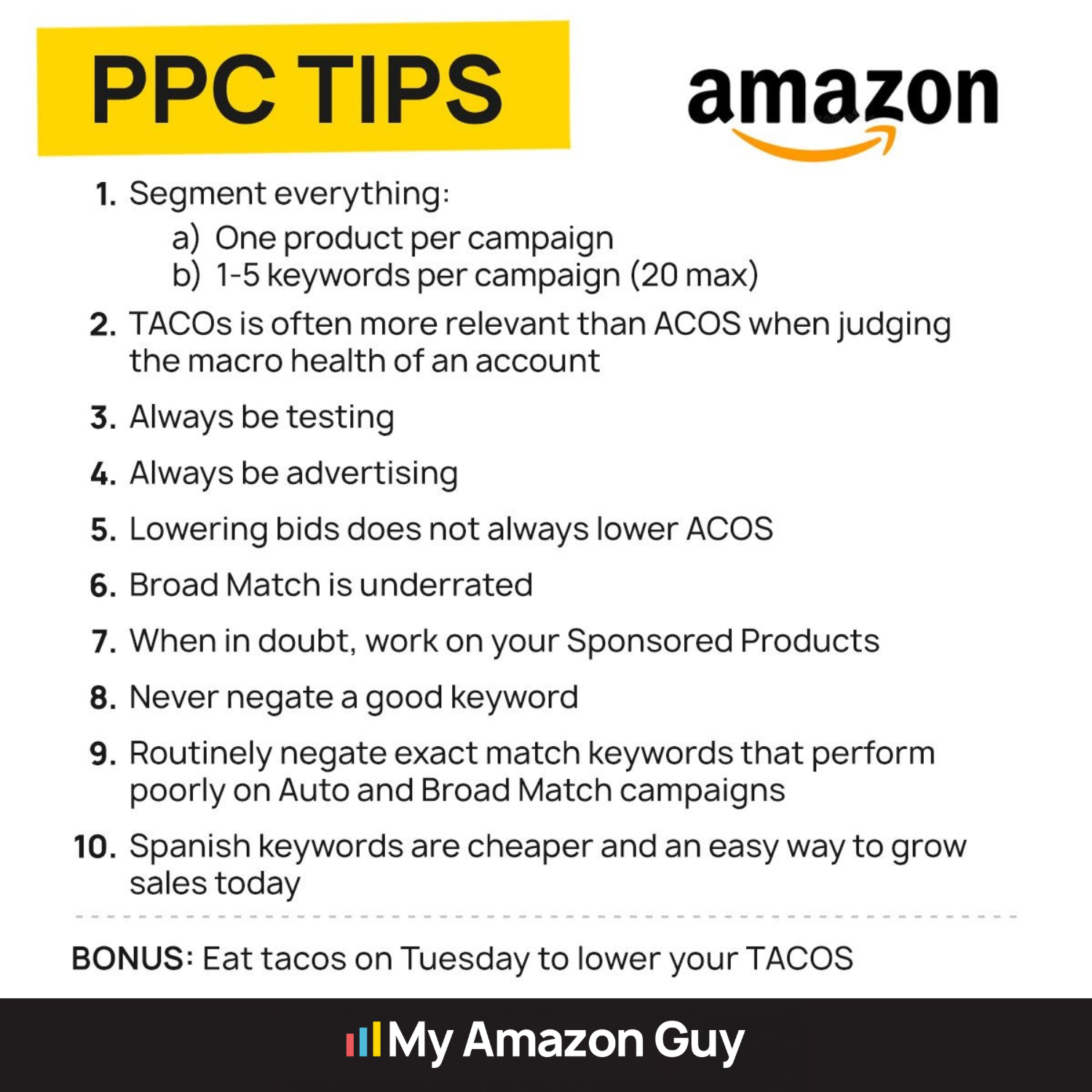
Some of the Golden Rules of Amazon PPC that My Amazon Guy’s CEO Steven Pope mentioned in this Amazon PPC [Master Class] 2022 are:
- Never run out of Stock.
- Never tap out on the budget.
- Lower bids if you have budget constraints.
- Always be advertising.
MAG can provide you with other helpful PPC tips and information to live by in order to succeed in Amazon advertising, so be sure to visit our prestige PPC page.
PPC Tip: Never Negate A Good Keyword
Summary:
In this module we will cover "Why you should never negate a good keyword on auto and broad campaigns"
In this video where Steven Pope discussed the top five mistakes in Amazon PPC Advertising, he demonstrated and explained why it is not a smart idea to negate a good keyword on auto and broad campaigns.
Top Amazon PPC Errors That Kill Profits
Here are the reasons why negating a good keyword on auto and broad campaigns is not advisable:
1. Data and Performance:
Successful keywords in auto and broad campaigns often gather valuable data.
Negating these keywords prematurely eliminates the opportunity to leverage the data for optimization.
2. Lower ACoS:
Broad match campaigns, when performing well, typically have a lower Advertising Cost of Sales (ACoS).
Negating a successful keyword may result in a new campaign with a higher ACoS.
3. Campaign Stability:
Making unnecessary changes to successful campaigns can destabilize their performance.
It's advisable to maintain stability in campaigns that are already delivering positive results.
4. Data-Driven Decision Making:
The existing data on successful keywords provides insights for informed decision-making.
Utilizing data-driven strategies is essential for refining and optimizing advertising efforts.
5. Campaign Efficiency:
Successful keywords contribute to the efficiency of the campaign by driving relevant traffic.
Negating them might lead to the loss of efficient targeting and potential sales.
6. Campaign Cost:
Creating new campaigns incurs additional costs and may not guarantee better performance.
Optimizing existing successful campaigns is often a more cost-effective strategy.
Key Takeaway:
- Negating good keywords in auto and broad campaigns is discouraged because it disrupts the natural optimization process, eliminates valuable data, and can lead to higher costs with uncertain benefits.
- It's recommended to let successful campaigns run and gather data before considering any significant changes.
PPC Tip: Never Mix and Match Types
in a Single Campaign
Summary:
This module provides a quick overview of the pitfalls associated with mixing match types and offers actionable tips for maintaining a focused and effective Amazon PPC campaign.
In the realm of Amazon PPC advertising, match types play a crucial role in determining when and where your ads appear. While it may seem tempting to combine different match types within a single campaign for convenience, this approach can lead to a host of problems that hinder campaign performance.
The Unique Roles of Match Types
Each match type serves a distinct purpose, offering varying levels of search term control and targeting flexibility.
Broad Match: Captures a wide range of search terms, including those with variations.
Phrase Match: Targets search terms that contain specific phrases in the exact order.
Exact Match: Matches search terms that precisely match the keyword.
Mixing match types within a single campaign disrupts this balance, making it difficult to optimize bids and evaluate performance effectively.
The Negation Conundrum
Negating keywords is essential for preventing irrelevant traffic and wasting ad spend. However, when different match types are mixed, negations become a tangled mess.
Negation Conflicts: Different match types can overlap, leading to confusion about which keywords are being negated.
Inaccurate Performance Data: Negation conflicts skew performance data, making it difficult to identify which match types are actually converting.
Compromised Placement Control: Negating keywords across different match types hinders granular control over ad placements.
Metrics Muddle
Combining match types clouds the clarity of your campaign's performance metrics.
Performance Attribution: Mixed match types make it challenging to attribute conversions to specific match types.
Misleading Insights: The overall performance data becomes convoluted, obscuring the true effectiveness of each match type.
Data Overload: A single campaign with mixed match types generates a mass of complex data, making analysis and optimization a daunting task.
Budget Battle
Amazon's algorithm allocates budget across all match types within a campaign, regardless of their performance.
Inefficient Budget Distribution: This approach can lead to high-performing match types being underfunded while low-performing ones consume excessive budget.
Campaign Stagnation: Without separate campaigns, it's difficult to optimize budget allocation for each match type, hindering overall campaign growth.
Reduced Control: Mixing match types relinquishes control over budget allocation, limiting the ability to maximize campaign efficiency.
Campaign Health Hazard
Combining high-performing keywords with irrelevant ones can damage your campaign's overall ad score.
Ad Rank Impact: A lower ad score negatively impacts ad rank, reducing ad visibility and lowering conversion rates.
Campaign-Wide Impact: The negative effects of poor ad score can ripple across the entire campaign, affecting all keywords.
Isolated Success: Separate campaigns for each match type allow high-performing keywords to shine without the drag of irrelevant ones.
Actionable Steps
To avoid the perils of mixing match types, follow these actionable steps:
Campaign Segregation: Create separate campaigns for each match type to gain clear insights into their individual performance.
Focused Negations: Regularly review and refine your negative keyword lists for each campaign to eliminate irrelevant traffic effectively.
Bid Optimization: Continuously monitor and adjust bids for each match type to maximize cost efficiency and drive conversions.
By adhering to these principles, you can harness the power of match types to optimize your Amazon PPC campaigns for maximum impact and profitability. Remember, a well-structured campaign with distinct match type strategies leads to a clearer path to success.
Key Takeaway:
NEVER mix keyword match types within a single campaign!
Mixing match types in a single Amazon PPC campaign can lead to a host of problems, including:
- Difficulty optimizing bids and evaluating performance effectively
- Confusing negations and compromised placement control
- Misleading metrics and inefficient budget distribution
- Damage to campaign health and ad score
To avoid these problems, you should:
- Create separate campaigns for each match type
- Regularly update your negations in a focused manner
- Continuously monitor and adjust your bids for better cost efficiency
New Vs Old Campaigns
Summary:
When taking over an existing account, a critical decision lies in whether to prioritize optimizing inherited campaigns or embark on creating new ones.
This module delves into the strategic considerations involved in striking the right balance between these two approaches, equipping you with the expertise to make informed decisions and maximize your Amazon advertising success.
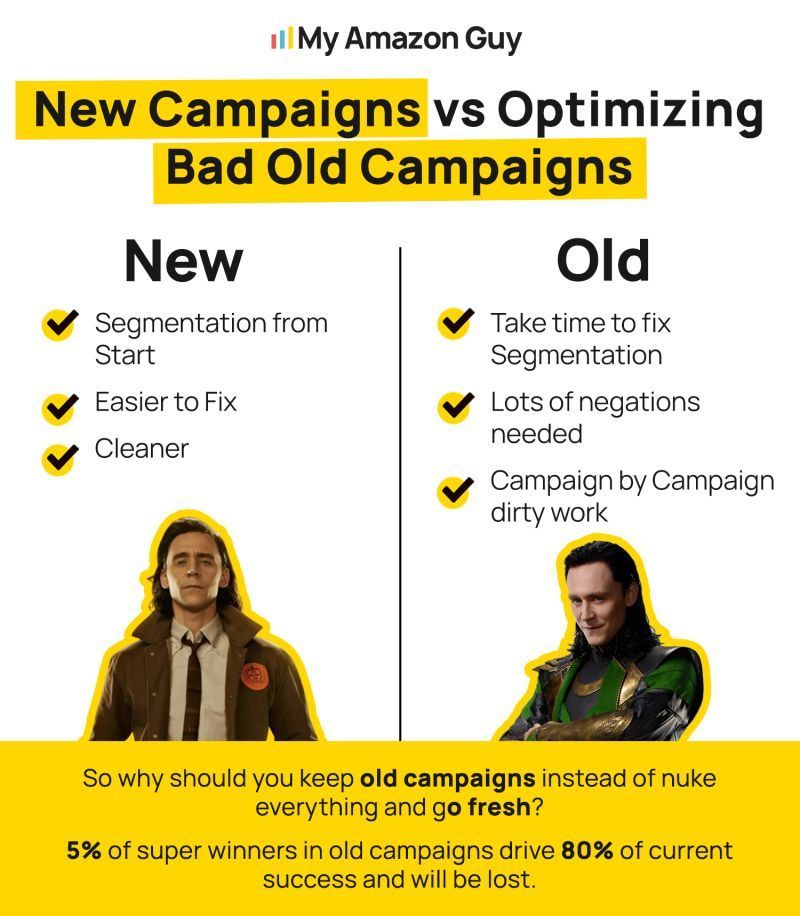
The Merits of Old Campaigns
While inherited campaigns may appear outdated and messy, they hold valuable historical data and performance insights that can inform future optimization efforts. These campaigns often contain a wealth of information about keyword performance, search terms, and customer behavior.
Discarding this data would be akin to starting from scratch, potentially replicating past mistakes and missing out on valuable learning opportunities.
Furthermore, old campaigns often harbor hidden gems – those top-performing keywords that drive a significant portion of the account's success. Identifying these "super winners" and segmenting them into dedicated campaigns can amplify their impact and boost overall advertising performance.
The Case for New Campaigns
Despite the value of old campaigns, new campaigns offer the opportunity to start with a clean slate, free from the constraints of past decisions and segmentation purgatory. New campaigns provide the flexibility to implement the latest targeting options, keyword strategies, and bidding approaches, potentially unlocking untapped potential.
Moreover, new campaigns can address specific gaps or shortcomings in the existing campaign structure. For instance, they can target new product categories, expand into broader geographic regions, or cater to different customer segments.
Striking the Right Balance
The decision to optimize old campaigns or start new ones is not a mutually exclusive one. Instead, the key lies in striking the right balance between the two approaches.
- Optimize Old Campaigns Strategically:
Keyword Segmentation: Segment keywords based on performance, relevance, and search intent to enhance targeting effectiveness.
Top-Performing Keyword Identification: Identify and optimize bids for those 5% "super winners" that drive a significant portion of the account's success.
Negative Keyword Targeting: Eliminate irrelevant traffic and improve campaign performance by implementing negative keyword targeting.
Campaign Settings Optimization: Refine targeting, ad placement, and bidding strategies using campaign settings to maximize impact.
- Introduce New Campaigns judiciously:
Evaluate Performance Gaps: Assess the need for new campaigns based on performance gaps, market insights, and untapped opportunities.
Gradual Transition: Gradually transition keywords from old to new campaigns to minimize disruptions and maintain campaign continuity.
Continuous Monitoring and Optimization: Closely monitor new campaigns, making adjustments as needed to optimize performance and maximize ROI.
Key Takeaway:
- When taking over an account, the trick is to optimize old campaigns and start fresh ones.
- 5% of the keywords within an old campaign contribute up to 80% of that campaign's success.
PPC Day Parting Analysis
Summary:
This module provides an overview of the PPC Day Parting Feature in Seller Central.
Amazon PPC day parting is a strategic advertising approach that involves adjusting your Pay-Per-Click (PPC) campaigns based on specific times of the day or days of the week. This feature allows sellers to optimize their ad spend by targeting periods when their target audience is more likely to engage and convert, ultimately enhancing the overall performance of their campaigns.
Video Learning:
Amazon PPC Day Parting - How Budget Rules Can Lower your ACOS
Here is a video of Steven Pope where he talked about the pertinent details about Amazon PPC Day Parting.
As an Amazon Specialist, you play a crucial role in optimizing ad campaigns to maximize their effectiveness and drive sales. One of the key strategies for achieving this is through day parting analysis, which involves understanding how orders are distributed across different days and hours of the day. Here is a step-by-step guide on how to utilize the day parting tool and analyze the data effectively.
Setting Up Day Parting: Step by Step
1. Access Campaign Manager:
Navigate to the Campaign Manager within Seller Central.
Select Campaign and Date Range:
Choose the target campaign and set the date range for analysis.
2. Access Campaign Settings:
Go to Campaign Settings and then to Budget Rules.
3. Add Day Parting Rule:
Click "Add Budget Rules" and label it as "Day Parting" or a name of your choice.
4. Choose Day or Week Parting:
Decide whether you want to set rules by day or week.
5. Select Days and Time:
Identify specific days and times when your products perform best. For example, Sundays and Mondays might be peak days.
6. Set Budget Rules:
Increase your budget by a certain percentage during the identified peak times.
7. Limit Budget During Non-Peak Hours:
Unfortunately, there's currently no decrease function, so you'll need to manually limit your budget during non-peak hours.
8. Monitor Results:
Keep a close eye on the performance during different times and adjust as needed.
Why Day Parting Matters:
Sundays and Mondays generally perform better for most brands.
Understanding your customer's behavior during specific times can help you avoid wasting clicks.
Considerations and Future Developments:
Performance-based rules are easier to set up but may not be as precise as day parting.
Currently, there's no bid-based rule option, only budget-based rules.
Limiting budgets during certain hours is a workaround until bid-based rules become available.
Accessing and Preparing Order Data
1. Locating Order Data: Begin by navigating to Seller Central and clicking on the "Menu" icon in the upper left corner. Select "Orders" and then click on "Order Reports."
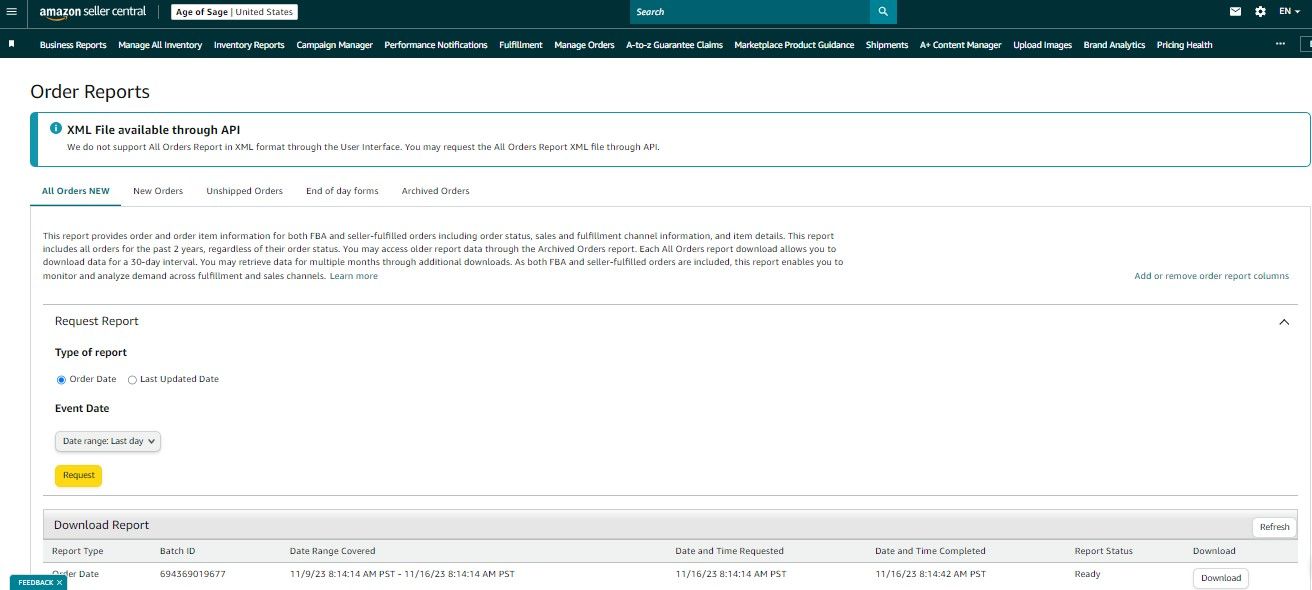
2. Downloading Order Data: Choose the desired date range for your analysis and click "Request." Wait for the download button to appear and then click it to download the order data.
3. Alternative Data Download Method: If you encounter difficulties downloading data from Order Reports, proceed to the "Menu" again. Hover over "Reports" and then click on "Fulfillment."
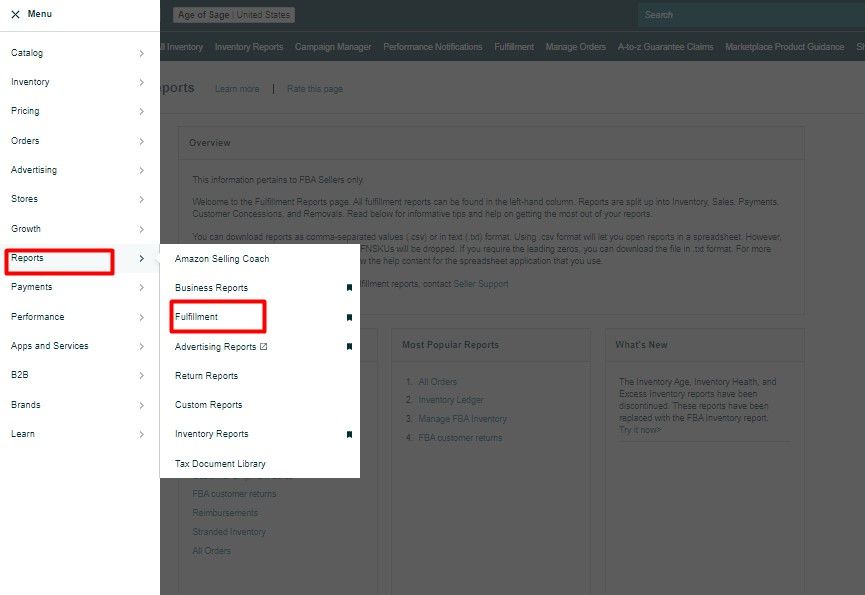
4. Retrieving Data from Fulfillment Reports: Under Sales, click "Show More" followed by "All Orders." Download the order data file.
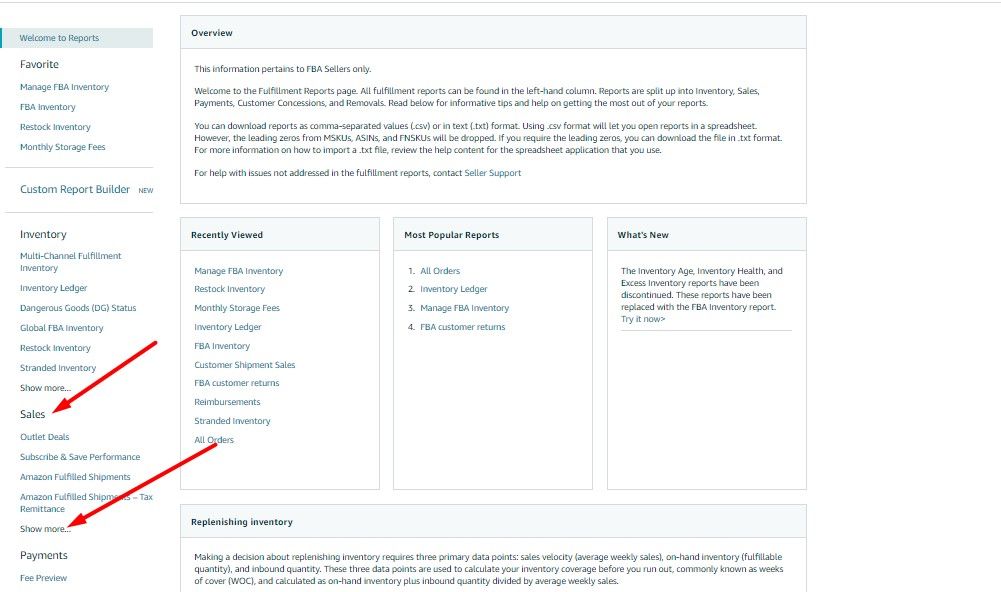
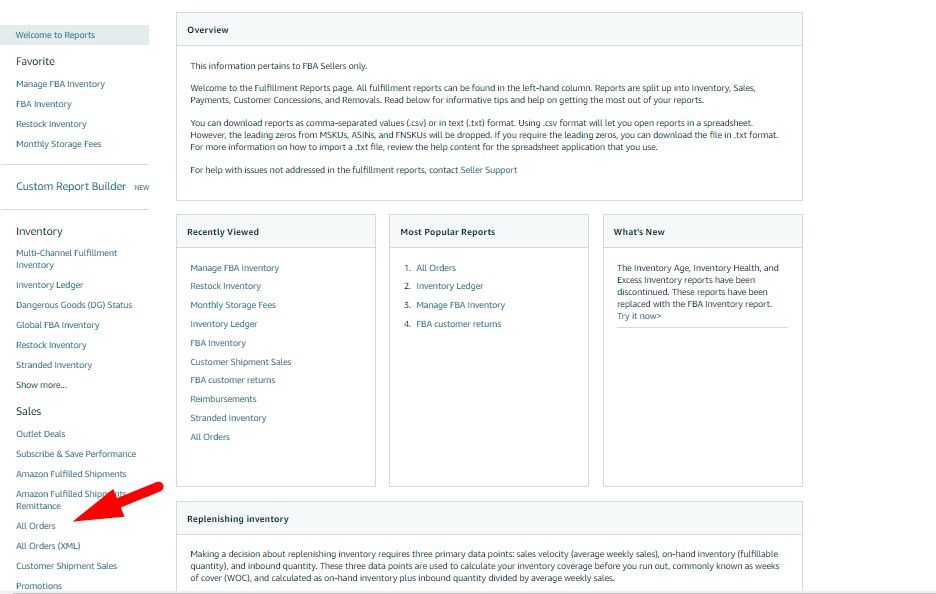
5. Data Compatibility: The downloaded file may open in Notepad. Highlight and copy the entire contents of the file.
6. Handling Additional Columns (Optional): If your data includes columns labeled "tax-collection-model" and "tax-collection-responsible-party" in columns O and P, refer to the provided video for guidance. If these columns are absent, proceed to the next step.
Utilizing the Day Parting Analysis Tool
1. Accessing the Tool: Open the Day Parting Analysis Tool (download by clicking the attachment button at the top right section of this page) and paste the copied order data into cell A1 of the "Order Reports" tab.
2. Data Analysis: Click on the "Analyzer" tab. Under Order Status, uncheck the "Cancelled" option. Similarly, under Sales Channel, uncheck the "Non-Amazon" option.
3. ASIN-Specific Analysis (Optional): For analyzing the sales behavior of a particular ASIN, click on the ASIN filter and click "Clear." Select the desired ASIN(s) and click "OK." Otherwise, select all ASINs.
4. Day-Wise Order Trends: The "Trend by Day" graph displays the total orders (Organic and Ad Sales) for each day of the week. Identify the days with the highest order volume to prioritize campaign or ASIN boosting.
5. Hourly Order Trends: The "Trend by Hour" graph reveals the hours with the most orders. Leverage this information to adjust bids for your campaigns at specific times of the day.
6. Data Interpretation: The tables below the "Trend by Hour" graph provide detailed explanations of the trends observed in the graphs.
Effective day parting analysis is an essential tool for Ad POCs to optimize ad campaigns, maximize sales, and achieve business goals. By understanding the day and hour patterns of order activity, you can make informed decisions about bid adjustments and campaign strategies. Utilize the Day Parting Analysis Tool effectively to gain valuable insights and drive impactful results.
Key Takeaway:
- Day parting is a new feature in Amazon's Seller Central that allows sellers to adjust their bids based on the time of day.
- Steven Pope tested day parting on one of his accounts and saw a 32% lift in revenue with only a 10% increase in ad spend.
- Day parting can be a more effective way to spend your ad dollars than performance-based rules.
- Amazon is incentivized to make you spend more money on ads, so they are adding new tools like day parting to help you do that.
- In general, Mondays and Sundays are the highest revenue days of the week on Amazon.
My Amazon Guy's Weekly
PPC AMA Videos (2021)
My Amazon Guy's PPC AMA videos are valuable resources for Amazon advertising knowledge. Explore the following links to view videos published in 2021.
My Amazon Guy's Weekly
PPC AMA Videos (2022)
My Amazon Guy's weekly Amazon PPC AMA videos serve as excellent supplementary resources for gaining insights into Amazon advertising. Below, you'll find links to the live-streamed videos from 2022.
My Amazon Guy's Weekly
PPC AMA Videos( 2023)
In the dynamic realm of Amazon selling, PPC advertising stands as a
powerful tool for driving traffic, boosting sales, and amplifying your
brand presence.
However, navigating the complexities of PPC campaigns can be a daunting
task, especially for those new to the game.
That's where My Amazon Guy's weekly PPC AMA (Ask Me Anything) videos
come in, offering a treasure trove of knowledge and insights to empower
your Amazon advertising journey.
To further enrich your Amazon advertising knowledge, explore the
following links to My Amazon Guy's weekly PPC AMA videos from 2023:
My Amazon Guy's Weekly
PPC AMA Videos(2024)
In the ever-evolving world of Amazon, PPC advertising remains a potent weapon for attracting customers, igniting sales, and amplifying your brand's voice.
But navigating the intricate maze of PPC campaigns can be intimidating, particularly for newcomers.
Fear not! My Amazon Guy's weekly PPC AMA (Ask Me Anything) videos are here to serve as your personal treasure map, guiding you through the Amazon advertising landscape with expert knowledge and actionable insights.
Expand your Amazon advertising expertise by diving into some of the invaluable resources from our YouTube channel
My Amazon Guy's Weekly
PPC AMA Videos(2025)
In the ever-evolving world of Amazon, PPC advertising remains a potent weapon for attracting customers, igniting sales, and amplifying your brand's voice.
But navigating the intricate maze of PPC campaigns can be intimidating, particularly for newcomers.
Fear not! My Amazon Guy's weekly PPC AMA (Ask Me Anything) videos are here to serve as your personal treasure map, guiding you through the Amazon advertising landscape with expert knowledge and actionable insights.
Expand your Amazon advertising expertise by diving into some of the invaluable resources from our YouTube channel!
2025 PPC AMA Videos:
July 8, 2025
Aug 26, 2025
Sept 16, 2025
Nov 12, 2025
Nov 12, 2025 (Special Topic)
Nov 19, 2025
Dec 2, 2025
Dec 10, 2025
Dec 17, 2025
My Amazon Guy's Weekly
PPC AMA Videos(2026)
In the ever-evolving world of Amazon, PPC advertising remains a potent weapon for attracting customers, igniting sales, and amplifying your brand's voice.
But navigating the intricate maze of PPC campaigns can be intimidating, particularly for newcomers.
Fear not! My Amazon Guy's weekly PPC AMA (Ask Me Anything) videos are here to serve as your personal treasure map, guiding you through the Amazon advertising landscape with expert knowledge and actionable insights.
Expand your Amazon advertising expertise by diving into some of the invaluable resources from our YouTube channel!
2026 PPC AMA Videos:
Jan 2026
Feb 2026
Mar 2026
Apr 2026