
SEO Training
Summary: Amazon SEO is an incredible traffic generating tool that can help develop and build and grow traffic on the Amazon platform using high ranking exact match, Back End Search Term optimizations, the right copy and keywords, in the right place, the proper utilization of copy and ALT Text in the EBC, and more.
What Will This Course Teach You:
- How to Utilize Keywords, EBC, Copy, and Amazon's Ranking and Indexing System to get more traffic for your listings
- The differences in a variety of SEO strategies on Amazon
- How to utilize best practices, avoid common pitfalls, etc.
Let's get started!
Search Engine Optimization Basics
Step 1: What Is SEO, and How Does it Relate to Amazon?
What is Amazon SEO, and How Does it Relate to Amazon?
Amazon SEO (Search Engine Optimization) is when you optimize a product listing for the A9 ranking algorithm. Optimizations refer to using high-quality images, using search terms in the listing’s copy (title, bullets, description), using a competitive price compared to the competition, etc.
When you improve a listings ranking, it leads to an increase in traffic, which should result in more clicks and sales, given you have an enticing offer.
When a customer enters a search term on Amazon, they usually click on the first handful of products from the first page. Rarely, do Amazon customers trickle down to the 2nd, 3rd, 4th page, etc. Having an optimized listing will increase the chances of a sale, increase organic ranking, and therefore, increase overall traffic over time.
In summary, the ASIN in the 1st organic position is the ASIN that is selling the most amount of units for that specific keyword. The more sales it gets, the higher the search results it will be shown.
As your First Stage of Learning Please Review the Following Videos:
- Optimizing SEO Search Terms and Keywords for Amazon Seller Central - Best Practices Tutorial
- 5 SEO Tips to Grow Amazon Sales
- Ad Badger's Amazon SEO Guide Part 1: Getting Started [PPC Den Podcast #111]
Step 2: Understanding what is the Amazon A9 Algorithm
What is the Amazon A9 ranking algorithm?
The Amazon A9 algorithm (named after the Amazon subsidiary A9 that developed the search protocol that powers the search toolbar) is the why in which Amazon determines which product the customer is most likely to purchase.
The more people click on a product listing, the higher the A9 algorithm will rank it.
What Factors Influence The A9’s Search Rankings?
Amazon A9 algorithm is classified into:
- Explicit Factors:
Price, Stock, Relevancy
A major price difference between your listing an a competitors can cause negative effects on your organic ranking
- Running out of stock is a common frustration among sellers. When a listing runs out of stock, your BSR will increase due to the lack of sales and your organic rankings will drop further down the pages. Staying in stock is essential.
- Ensure you have the right keywords included in your listings. Including high volume, relevant keywords while prioritizing the placement of those keywords will be critical to the indexing and ranking for that product.
2. Inexplicit Factors:
- Sales
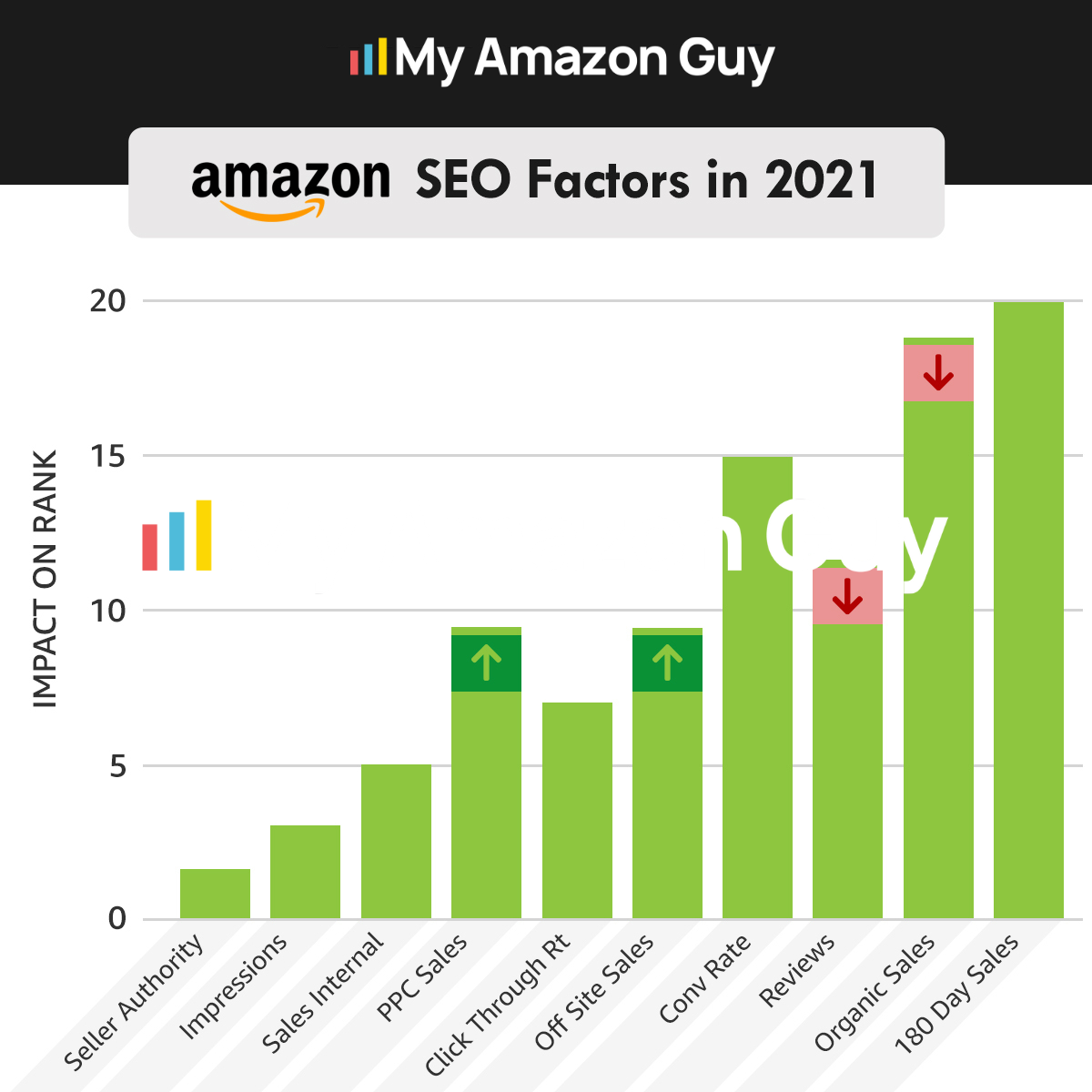
With more sales comes a bigger push from Amazon's algorithm for that listing, on specific keywords the product received sales from. A listing gains higher rankings the more sales it acquires.
Step 3: Ending the Debate - What Does Amazon REALLY Count in Back End Keywords?
Summary: This training will go ahead and teach you the basics, of what Amazon recognizes for its limits in bytes.
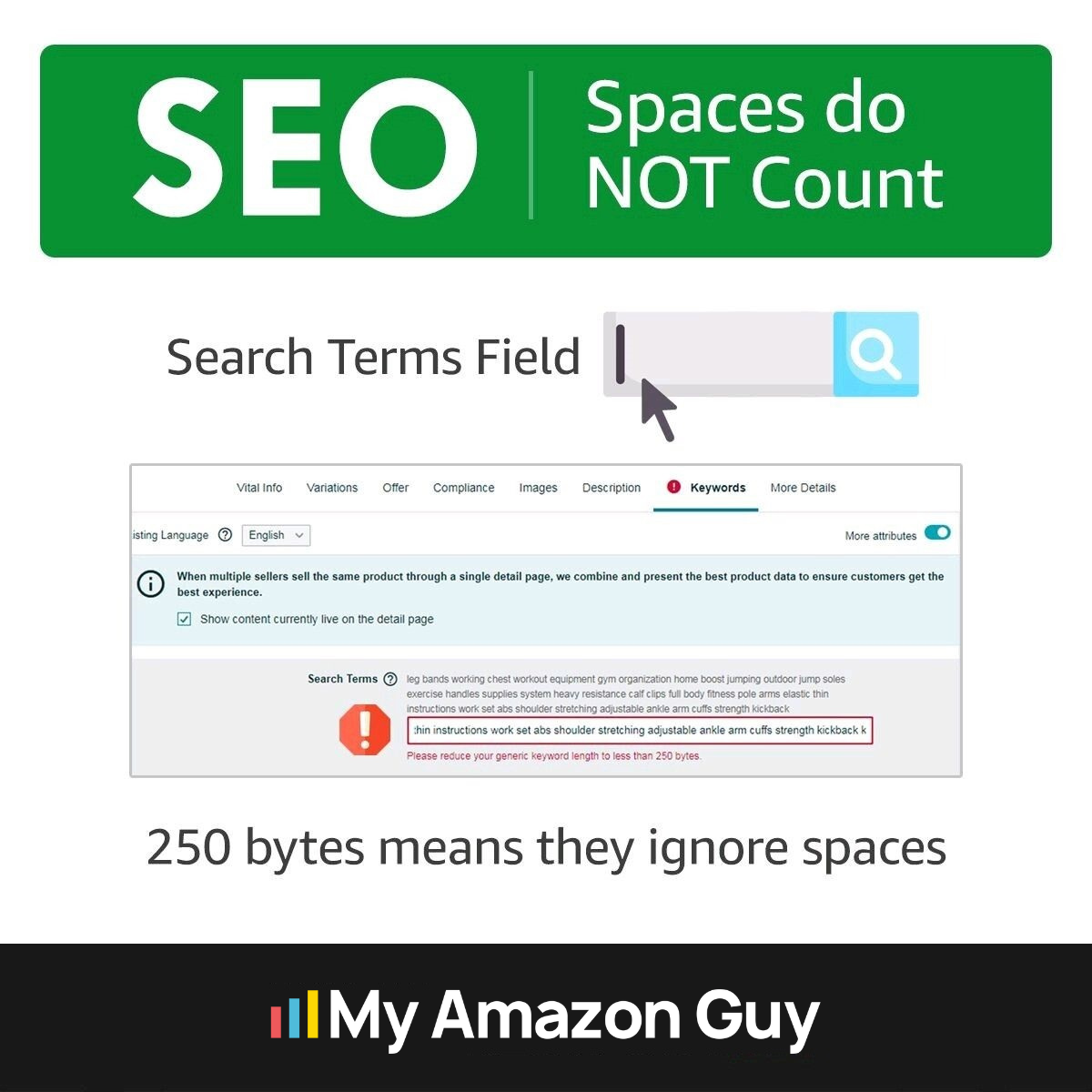
The infographic above features the back end of a product listing. To access this, go to Inventory>Manage All Inventory.
*** Amazon Seller Central’s user interface often changes, so you might find the screenshots and steps shown here to be slightly different from the current live version (when you are taking the course or accessing your catalog). However, we’ll be showing below the screenshot from when this course was recently updated. Discrepancies in the layout and menus may also be due to the product category.
This will take you to a page where you can manage your catalog or inventory.
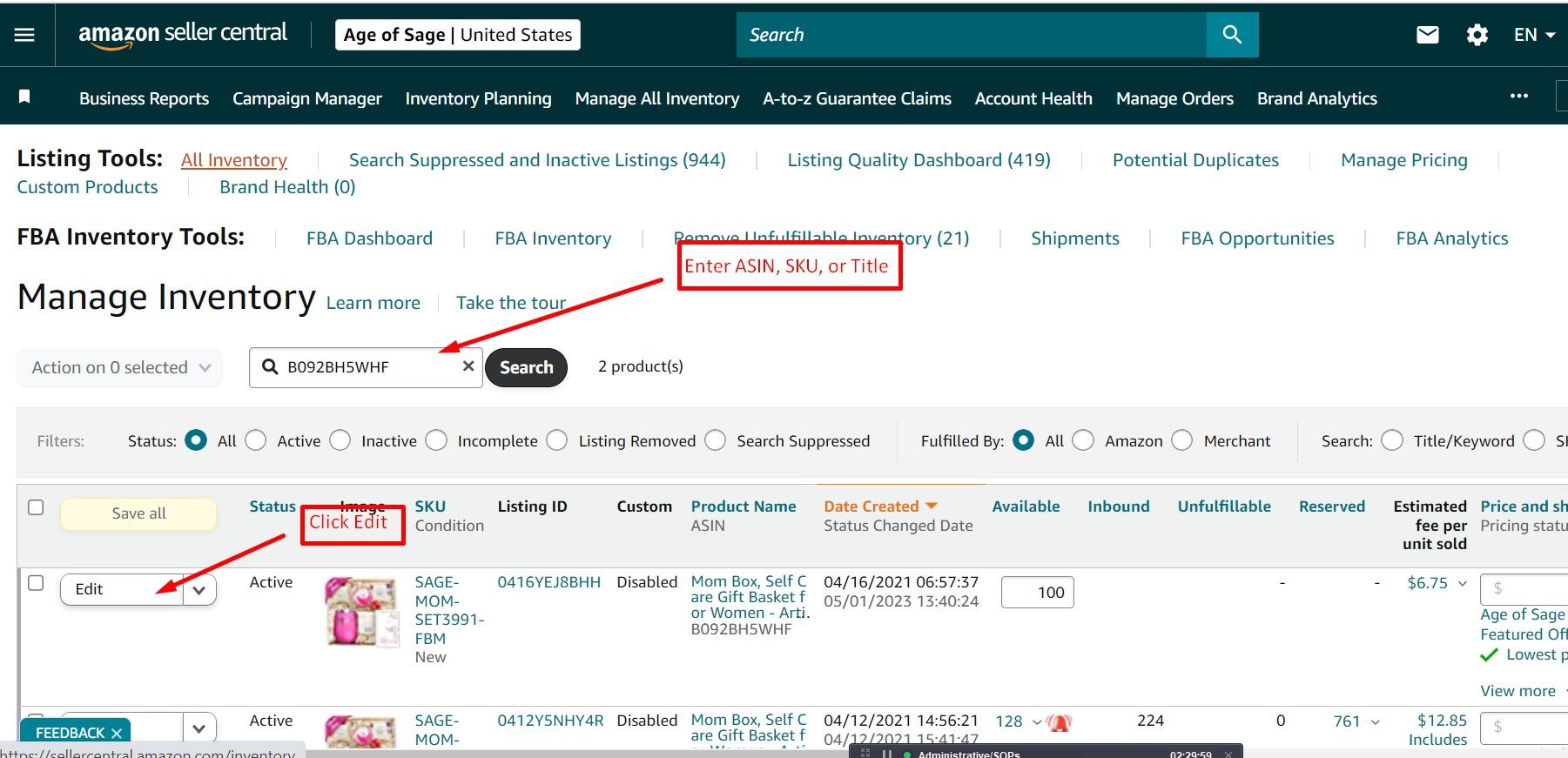
1. Enter The ASIN, SKU, or Title of your product (Don’t forget to apply the applicable Filters)
2. Click on the Edit button.
After clicking “Edit”, you’ll be taken to a page that looks like this:
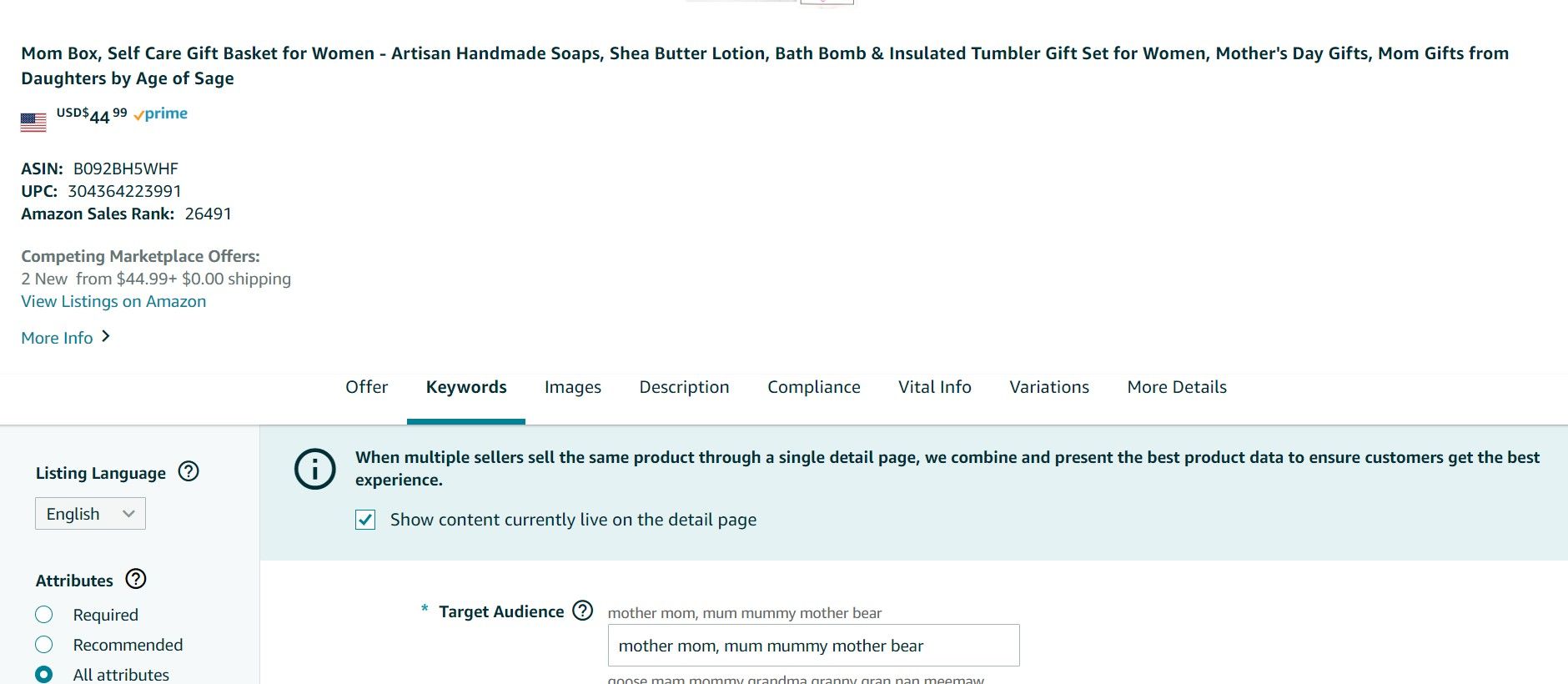
Click the “Keywords” tab and then scroll down until you see something like the screenshot below.
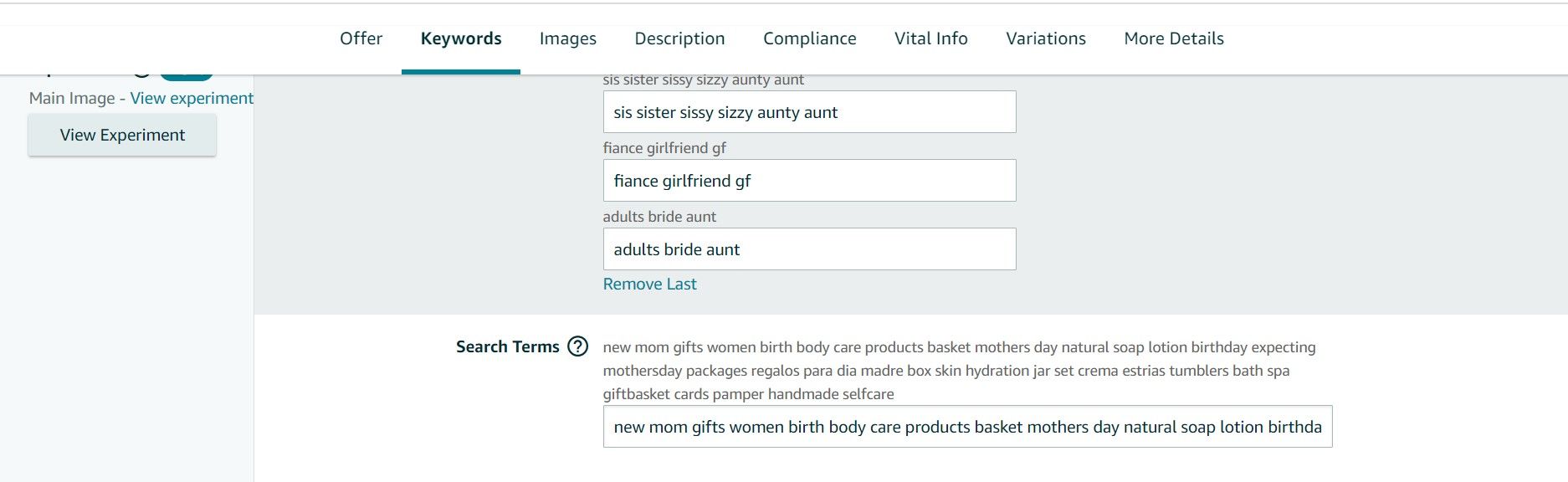
Bytes vs Characters:
In the most important discovery since Steven Pope proved A+ Content indexes on Amazon, My Amazon Guy is yet again at the forefront for industry best practices!
Action:
Please skim this article and view the video at the end for timestamps 9:50 - 23:00 only.
https://myamazonguy.com/all-the-amazon-seo-tools-are-wrong/
Unlike other tools that count characters only, this tool can be used to count the bytes (without spaces).
https://charcounter.com/en/
Step 4: Indexing Versus Ranking
Summary: Indexing and Ranking are two commonly used terms on Amazon, in relation to the Amazon SEO process.
Think of Indexing Versus Rank in a Two Step Manner:
Step 1: You must be indexed
Step 2: You can then "rank" on your indexed keyword
Video: Optimizing SEO Search Terms and Keywords for Amazon Seller Central - Best Practices Tutorial
Index Vs. Rank
Index:
- Being indexed means that your product is searchable on Amazon for a specific keyword.
- Typing a keyword into Amazon will bring up various products in the search results for that given keyword. For example, if a listing indexes for "wine glass", your product will be in the search results when a buyer looks for wine glass on Amazon.
- An easy formula to check if your product is indexed for a specific
keyword is by typing in the search bar "ASIN + Keyword".
If your product appears, you are indexed for that keyword.
Rank:
- Ranking means the position your listing is on for specific
keywords.
Note: You can't rank for a keyword without being indexed for that same keyword.
- An Amazon sales rank or BSR (best sellers rank) is a number typically (in most categories) between 1 - 1 million. It describes how well your product is selling in relation to other products in that same category. The lower the BSR rank, the better a product is selling.
Take Away: Indexing Means a Search Term is attached to your product, while ranking means how well or how high the product “ranks” or shows up on Amazon.
How to Improve your Rankings Through Traffic and Conversion?
Amazon SEO: How To Improve Product Rankings On Amazon?
Step 1: Amazon Product Title
- The foremost factor to focus on to boost the product’s visibility and rankings are your product title. Ensure that you incorporate all the relevant information in your title, keeping the product name first.
Step 2: Amazon Keyword Research For Product Keywords
- Select the best keywords for the product(s) that you are selling. An ideal way to do this is by looking at the top-selling products in your category. Analyze them and extract their keywords.
Step 3: Amazon Product Price
- Whenever you set a “price” for your product, make sure to check the competition for all the identical products. Bigger price gaps are never going to win. Always try to beat or match your competition’s price. Try to lower the prices to irrational amounts to chuck out the small fish.
Step 4: Amazon Product Images
- Never underrate the strength of the images. It is one of the most essential sales arguments. Product pictures are key sales drivers. Although they don’t affect Amazon SEO directly, they do impact greatly in breaking the bounce rates.
Step 5: Amazon Product Description/A+ Content
- Apart from the other key aspects, the product description serves to persuade the customer for a purchase. Therefore, it is important to highlight the positive characteristics of the product.
Step 6: Amazon Product Features In Bullet Points
- Since Amazon offers a lot of space to write for your product, there is a lot you can play out here. When it comes to “product description,” buyers or shoppers are never going to like it if it has huge chunks of information in paragraphs rather than in neat, clear bullet points describing every feature of the product.
Step 7: Product Stock Availability
- It is significant to ensure that your product never runs “out of stock,” as this can lose you a huge amount of rankings.
Step 8: Product’s Backend Search Keywords
- Now, these search terms are hidden from shoppers but usually are indexed by Amazon’s A9 algorithm. Therefore, they can have an immensely positive impact on a product’s search.
Step 9: Product Reviews And Ratings
- When it comes to Amazon SEO, a product’s ratings and reviews are yet another pertinent components, which is evaluated and considered for better rankings. Simultaneously, they make sure that there is an indirect improvement in the rankings
Step 10: Use FBA For Your Product
- Selling via FBA enables better customer experience and trust. This, therefore, helps convert shoppers into purchasers and therefore, has an impact on sales velocity over time.
What Factors Influence Ranking?
Amazon SEO Ranking Factors
There are three kinds of ranking factors we’ll cover here: text-based, relevance-based, and conversion-based.
Text-Based Ranking Factors
Text-based ranking factors are sort of the bare bones of SEO. They concern whether the text in your listing – title, description, etc. – uses or references the keywords where you’re trying to rank organically. If you don’t have a keyword or keyphrase on your listing, there’s a really good chance that you won’t rank for it.
Using organic keywords in your listings seems like a no-brainer. However, most people focus on ultra-optimizing for a few keywords when they actually want to rank organically on many more keywords.
The most common mistakes people make here are having product listing text that’s too short or using text in their images. (We’re not talking about alt text here, that can be super useful.) That’s organic ranking power that’s left on the table.
Relevance-Based Ranking Factors
When you’re making sure that the organic keywords where you want to rank are actually relevant to your product and people searching for it, you’re paying attention to your relevance-based ranking factors. Amazon rewards organic results with high conversion rates, and a good way to up your organic conversion rate is to focus on keywords that customers would actually be searching if they wanted to buy your product.
Keeping your keywords relevant to the listing gives you a better chance of good conversion rates and better organic rankings. If you rank for a bunch of keywords that aren’t actually relevant to your product and you get a bunch of clicks without conversions, your organic rankings are going to plummet because Amazon thinks that shoppers don’t want your product.
Conversion-Based Ranking Factors
Conversion-based ranking factors are all about how good your listings are at enticing your customers to buy. Amazon, like any business, wants to make money, so it’s in its best interest to favor listings with high conversion rates. The better your conversion rates are, the higher your organic rankings.
Amazon has all kinds of features you can use to help convince buyers to convert. Take advantage of them. Use good, high-quality product listing images, use video if possible, and have rich, informative product descriptions. What your product is, who your product is for, and what problem your product solves are all things that should be readily apparent to anyone who views your product listing.
Don’t get too comfortable resting on your keyword laurels and neglect to pay attention to these factors. Even if you have the best possible keywords, your SEO strategy can totally fall apart if those conversion-based ranking factors aren’t there.
Conversion-based ranking factors are paramount for crisis-proofing your listings. If, for whatever reason, your listing gets pulled and you have to recreate it and start from scratch, spending time on your conversion-based ranking factors can help you get back on track.
Source: https://www.adbadger.com/blog/amazon-ppc-education/starting-amazon-seo/
Step 4A: What Factors Influence Ranking?
Summary:
There are 3 main factors that influence ranking on Amazon: Text, relevancy, and conversions.
Text-Based Ranking Factors
Text is the bare bones of SEO. We need to utilize text inside the listing in order to index for different keywords on Amazon. When you add keywords to the listing (title, bullets, description, backend keywords, alt text, etc.), Amazon crawls the copy and associates the listing with the keywords included. If you don't have keywords included in your listing, you likely will not index for them and therefore, you won't rank.
The biggest mistake sellers use when crafting their listings is not including as much text as they have room for. Correctly utilizing the right amount of keywords in each section of your listing is essential for full ranking potential.
Relevance-Based Ranking Factors
You need to make sure your product is relevant to the keywords you're associating with it. Amazon is a search engine for customers. When they type keywords into the search bar, they intend to find products that are in line with those search queries and purchase. Including non-relevant keywords will hurt your conversions which will, in turn, hurt organic rankings. Utilizing relevant keywords throughout your listings will help create good conversion rates. The more conversions (sales) a listing makes, the better the organic rankings it will have. Let's cover this part next.
Conversion-Based Ranking Factors
As stated above, the more conversions a listing gets, the more sales it gets. In turn, the more sales a listing gets, the better Amazon will reward it by increasing organic rankings. A conversion rate is a rate at which a customer falls on your listing and purchases the product. Amazon wants to make money, so the algorithm will favor listings that result in a sale on a given keyword.
Increasing conversions can take many forms. From high-quality images, well-written copy, competitive price points, good reviews, and many more factors.
Step 5: Organic Ranking Versus Sponsored Ranking
Summary:
There are common questions about what is organic and sponsored ranking. What is more important? What's the difference? Where should I focus? This training module will address some of these questions, and, allow you to see and know the difference.
Organic Ranking:
Organic ranking is the position that a product appears in Amazon's search results without any paid advertising or promotion. For example, a customer searches "wine glass" on Amazon and your listing is on the first page, position 12. Therefore, you are in the 12th organic position for that exact keyword.
BSR vs Organic Ranking:
When comparing BSR to organic rank, we need to consider the keyword being used. If a product is ranking on the top half of the first page for a high volume, relevant keyword, it will likely have a low BSR. Meaning it's selling very well, hence why it is able to maintain such a premium organic position. However, if you use that same product and search on a low volume, nonrelevant keyword, you may not even see the product in the first few pages of search results. Adversely, just because a product ranks high on Amazon’s search results doesn’t necessarily mean that it will have a good BSR.
Sponsored Ranking:
A sponsored rank is a position that a seller pays for on particular keywords in order to give their product keyword ranking boosts. If a product does not have high organic rankings for specific keywords, you can utilize Amazon's Pay-Per-Click (PPC) in order to gain more traffic to that listing.
Does PPC Help Organic Rankings?
The answer is, yes! Amazon prioritizes listings at the top search results that are most likely to result in a sale. PPC allows sellers to pay for that placement. If the ads convert well at that placement, Amazon will associate the product to that keyword and reward the listing over time, with better organic rankings for that keyword. It's important to understand that when PPC is not converting for specific keywords, it can have a negative effect on the organic ranking.
What is the difference between Amazon Best Sellers Rank and organic ranking?
Sales vs. keywords! A product's BSR is how well it ranks based on sales while the organic ranking is how well the product ranks in search for given keywords. Therefore, you can have high sales (low BSR) but low organic ranking for keywords that you don't convert well for.
Take Away:
- Organic ranking is how well your ranking for a specific keyword.
- Sponsored ranking is where your listing appears as a paid position.
- PPC allows you to gain more traction for specific keywords, therefore, increasing the organic rankings for those keyword.
Step 6: Practice - Organic Search Results
Summary of Action:
Now that you know what SEO stands for, what it is and how Amazon uses it in their A9 Algorithm, let's practice.
Instructions:
- Go to Amazon.com
- Search "Water bottle"
- Determine which ASIN is producing the highest amount of organic sales based on that search term.
Step 7: Practice - Byte Counter Tool
Summary of Action:
Now that you know that all other SEO tools are wrong and that Amazon counts bytes, not characters, for backend search terms, let's practice.
Instructions:
- Use the byte tool we discussed earlier (you should have saved this to your bookmarks tab already)
- Use the below keywords and confirm how many characters and how many bytes are included.
- stainless steel replacement spigot beverage dispenser metal silver drink jar glass gallon spout water plastic punch ceramic valve gasket container core stand pineapple tea jug insulated pitcher crystal circle lemonade galvanized refridgerator glassware iced oak leaf cooler watermelon
Step 8: Prohibited Keywords
Prohibited Keywords:
Prohibited words are any words or phrases that violate Amazon's terms of services (TOS) and would likely result in a listing suppression.
Action:
Skim the prohibited keyword list document (not conclusive) to
understand the basics of what terms you cannot use.
To download the prohibited keyword list, click the  icon on the top right of
the screen to show the attached file.
icon on the top right of
the screen to show the attached file.
Notes:
As a rule of thumb, take extra precautions when updating keywords for any health products, topical or consumable products. We want to ensure there are no "trigger words" being updated that would result in listing yanks.
Summary of Action:
Now that you know what prohibited keywords are and the basics of what you cannot include inside any areas of your listings, let's practice QAing. Pretend this is a client's backend keywords and you are about to submit them for upload. If you didn't QA them and spot these prohibited words, the listing would likely get yanked after upload.
Instructions:
- State the keywords/phrases from the list below that would be considered "prohibited keywords".
Hint: there are 6 words
Keywords:
horse supplement equine cures arthritis fresh saver formula strength hoof coat pellets flex antibacterial buteless paste senior leg best feed productos para caballos carreras relief stop power linament animal detox calf supplies pony barn powder daily hooves germs
Step 9: Product Launches, Honeymoons, and SEO, Oh My!
Summary: The honeymoon period on Amazon refers to a short window of time after a product is launched and was not created intentionally. It is, rather, a by-product of how their algorithm works – the same algorithm which helps customers find the most relevant products for their searches. Typically 15 – 30 days long, this period presents a massive opportunity to boost sales, get reviews, and promote a listing.
Video Learning:
- Is There an Amazon Honeymoon Period, and How Do I Grow Sales Fast?
- Amazon FBA Honeymoon Product Launch MYTH or FACT?
- INCREDIBLE AGE OF SAGE LAUNCH!
Take-Aways:
- Preparation is Key
- Having a fully optimized listing, (Copy, SEO, EBC, etc) + plus a pre-baked PPC strategy, along with having key exact match keywords to aggressively target in the first 30 days, is IDEAL in getting the most out of the honeymoon period.
- Prepare to Spend Heavily on PPC, and Potential Give Away Strategies, but it could reap dividends later on.
How to Start Amazon SEO
Step 0: Start Your Keyword Research with Competitor ASINs
What is Competitor Research:
Competitor research gives you a high-level overview of how your competitors are performing on the Amazon Marketplace. This report helps you see where your brand stands against the competition. With the right tools, a competitor research report will also gauge the overall sales and activity of similar items in the Amazon marketplace based on a search term.
Below are the necessary steps you need to take in order to conduct competitor research:
Perform an Amazon search of your main keywords.
Identify the most relevant seed keyword of your product and run a search in amazon.com. This will help you identify the main players in your category. Go through the first to the 3rd search results page and note any patterns that you notice. This may appear on the titles, how the main images look alike, the number of product reviews the listing has, and its prices. This is also a good opportunity for you to analyze your competitors' targeted keywords.
In most cases, your competitors will include their primary keywords in their product titles. This is a time-consuming process when done manually, so you might want to consider using keyword strategy tools like Helium10 or Junglescout. Here at MAG, we like to use Helium10. Tools like this will help you see which keywords your competitors are ranking for, including other metrics like Search Volume, Organic Ranking, and more.
Assess your competitor's prices
One factor that influences buyers to purchase your product is your price. Here's an example. Product A and Product B are similar products with similar review ratings. However, Product A is cheaper compared to Product B. Buyers will most likely go for the cheaper option. The process of assessing your competitor's prices can help you influence buyers and convince them to buy your products, but you should also remember that shoppers looking for high-quality products are drawn more to listings that highlight the product features. For customers like these, they wouldn't care if your products are half the price of your competitors. They put more bearing on listings that are properly and aesthetically curated.
Competitor listing audit
If you do not highlight your product attributes and fail to optimize your listings, including your image stack, you won't attract buyers. Below are components that you need to look into when auditing your competitors' listings
- Titles and Bullets - They must contain relevant and non-repetitive keywords
- Images - They must have the highest quality images and infographics. Videos are a plus!
- Reviews - See how many reviews each competitor listing has and spot the pain points of their product. This will give you the opportunity to magnify the benefits of buying your product over theirs.
Check the monthly sales of your competitors
To get a good understanding of how much your competitors are moving their inventory, you must check their monthly sales. The last thing you want is to sell a product that nobody wants to buy. To confidently sell a product, your competitors should be in a market that is trending up and is high in demand. There are many tools in the market that can help you identify your competitor's average sales and ratings.
My Amazon Guy Recommended tools:
- H10 Xray
- H10 Cerebro
- Zonguru
Take Away:
Understanding your competitive landscape will help you grow your business on Amazon. By researching your competitors’ prices, reviews, search ranks, ratings, revenue and sales, you can equip yourself to compete in the Amazon marketplace.
Step 1: Optimization - Backend Keywords Field
Summary:
The backend search field is important when it comes to Amazon SEO. This field allows for 250 bytes of long-tail keywords, misspellings of high search volume fields, Spanish translation, etc. This field is all for mass indexing and can have an effect on increasing ranking as the listing matures on Amazon.
Guidelines:
- 250 bytes
- Relevant Keywords
- Misspellings
- Spanish
- Do not include brand names, repeating keywords, "to, the", the plural of words already placed, or any term that could make a claim, or violate Amazon's Terms and Conditions.
Backend Search Term Field Best Practices
1. Ensure that you closely research the product (s) you are working with, and remove the following types of keywords:
- Non-Relevant Keywords - relevancy checks, ensure that the keywords are relevant, and relate to the product at hand
- NEVER USE Competitor Brand Names
- Never use any prohibited terms
- Ensure that keywords are not duplicates
- Remove commas
- Use bytes, not characters in your search term fields
2. Ensure that you use different keywords for items in a parentage.
- This will allow the parentage as a whole to index for more keywords across all child ASINs
3. Other attributes should be filled in
- Even though they are not as impactful, these fields should be filled out at the very least.
- Find relatable keywords to the other attributes.
- Make sure each attribute is filled out (Keep clicking add more until it will not let you do so any longer.)
Example Listing: Age of Sage Gift Set
Example Back End Search Term Set 1:
mom women gift basket mothers day pampering sets bath kit best packages push presents baskets package box set friend spa washer deluxe relaxing cheap young motivated daughter mom bomb useful relaxation sister mom christmas camping perfume regalos dia la madre home lavender luxury bathroom
Example Back End Search Term Set 2:
mom women gift mothers day pampering sets bath kit care packages push presents baskets box friend spa washer deluxe relaxing young motivated daughter mothersday bomb useful relaxation sister christmas camping perfume regalos dia la madre jar crema
Which Set is Correct and Why?
Set 2 is the correct use of the search term field. Let's highlight some errors in set 1:
1. Plural and singular are used (women vs woman, friend vs friends).
- Only one is needed as Amazon understands the difference between the two and indexes for both.
2. Uses 289 bytes.
- The backend search terms allow for 250 bytes.
3. There are a prohibited words being used.
- "best", "cheap" are prohibited words that could risk the listing being yanked.
4. Words repeat throughout.
- "mom" is repeated twice.
Step 2: SEO Optimization - Listing Title
Titles:
The title on Amazon is one of the most important aspects of the SEO experience on Amazon. Not only is the title the most customer visible aspect of the listing (conversion), it also ranks among the highest (if not the highest) in the Amazon algorithm for SEO indexing and ranking. Having a well-optimized and compliant title is imperative for success on Amazon.
Title requirements apply to all products on all of Amazon’s worldwide marketplaces. The four criteria that could cause a product to be search-suppressed are:
- Titles must follow the recommended length of your product category characters, including spaces.
- Titles must not contain promotional phrases, such as "free shipping", "100% quality guaranteed".
- Titles must not contain characters for decoration, such as ~ ! * $ ? _ ~ { } # < > | * ; ^ ¬ ¦
- Titles must contain product-identifying information, such as "hiking boots" or "umbrella".
Failure to comply with these requirements may cause a product to be suppressed from Amazon search results
Title Length: Generally between 150 and 200 characters, but is category dependent.
Other Best Practices:
- Utilize your brand name at the start of the title if you have brand awareness
- Do not use competitor brand names, trademarked or copyrighted terms, gifting terms, claims, or anything else prohibited by Amazon terms and conditions. Do not plagiarize other listings.
- Utilize the most descriptive, relevant, and highly ranked keywords for your niche for the title. This is imperative.
Amazon Recommendations for Other Best Practices:
- Don't use ALL CAPS.
- Capitalize the first letter of each word except for prepositions (in, on, over, with), conjunctions (and, or, for), or articles (the, a, an).
- Use numerals: "2" instead of "two".
- Don't use non-language ASCII characters such as Æ, ©, or ®.
- Titles should contain the minimal information needed to identify the item and nothing more.
- Don't use subjective commentary, such as "Hot Item" or "Best Seller".
- Titles can include necessary punctuation, like hyphens (-), forward slashes (/), commas (,), ampersands (&), and periods (.).
- Titles can abbreviate measurements, such as "cm", "oz", "in", and "kg".
- Don't include your merchant name in titles.
- Size and color variations should be included in titles for child ASINs, not the main title (see below).
Source : https://sellercentral.amazon.com/gp/help/external/YTR6SYGFA5E3EQC
Example Listing: Age of Sage Gift Set
Example Title Set 1:
Mom Spa Set Gift Basket for Women - Luxury Bath Set Soap Bars, Body Lotion, & Bath Bomb Care Package for Friends - Pampering New Mother to be Gift Box Set - Relaxing Bath and Body Beauty Gift Set
Example Title Set 2:
Age of Sage - Mom Spa Set Gift Basket for Women - Luxury Bath Set Soap Bars, Body Lotion, & Bath Bomb Care Package for Women - Pampering New Mom to be Gift Box Set for Women
Which Set is Correct and Why?
Set 1 is the correct use of the title format. Let's highlight some errors in set 2:
- Only 173 characters.
- Titles, in most categories, should be 200 characters. Not taking up the entire character count leaves keywords out that could otherwise be utilized for powerful indexing.
- Brand name is at the front of the title.
- Although in most cases, this would be an acceptable format, let's pretend this brand has no brand awareness. By putting the name at the front, it's taking up 12 characters that could be used more effectively.
- Keywords repeat themselves too often.
- "mom", "women", "set" are used too many times. It's okay to repeat words in the title in order to make sense and have readability, however, we could update to other words such as "sister, aunt", etc in order to acquire additional indexing for high volume, relevant keywords.
Step 3: Listing Copy - Bullet Points
Summary:
Bullet points should address the customer’s need for the product, such as “What problems does this product solve?” “Who is this product designed for?” “How can we remove fears/worries with this product?”
Guidelines:
- Bullet points should also comprise at least 200 characters.
- Incorporate as many SEO and long-tail keywords as possible without ruining the flow of the bullet point.
- It must still be coherent and readable instead of a bunch of SEO crammed together.
- Begin bullet points with something to separate from the rest of the text. The statement followed by a dash (-) or colon (:) works best (no odd characters or symbols allowed, save for emojis)
- Address items such as product description, dimensions, weight, the age range of users, ideal conditions for the product, problems product solves, country of origin, product uses, added accessories, etc.
- Get the point across without being wordy
- Include as much SEO as possible, with both individual keywords and keyword or long-tail phrases.
- The better the SEO is ranked organically, the better it is to include in the first or second bullet points.
- 200-250 characters is about the sweet spot for bullets
Avoid:
- Odd characters ($, #, trademark symbols ⓒ™ ℗, etc.)
- Website links (including links leading to other Amazon websites)
- Customer Reviews
- Prohibited Keywords/Phrases
Source: https://sellercentral.amazon.com/help/hub/reference/X5L8BF8GLMML6CX
Step 4: Design Based SEO
Infusing SEO Within Design
There are a few ways that you are able to infuse SEO within A+ content on each listing. Not incorporating these elements will prevent full SEO benefits.
- Crawlable text
- Alt text
What is Crawlable Text
Crawlability is when a search engine can read and scroll the content (text) on a webpage.
Although Amazon says they do NOT index A+ content crawlable copy, Steven has debugged that myth and found that they DO.
By embedding search terms in all areas that are crawlable on an Amazon product detail page, the higher chances of additional indexing, ranking, traffic, and therefore, sales.
Main Methods:
- Add 500+ words of copy
- Keywords in copy, headlines
- Take up more space and take away from competitors and other Amazon elements that won't help your sales
- Use custom templates to build as you have assets available
Goals:
- Increase total keywords ranked for
- Increase keyword rankings to be higher on page 1
- Increase traffic to the listing
Action:
Please watch this video on A+ content crawlable text: https://youtu.be/JBc4MGBO--Q
View this image comparison below to understand the differences between crawlable and non-crawlable text within A+ Content.
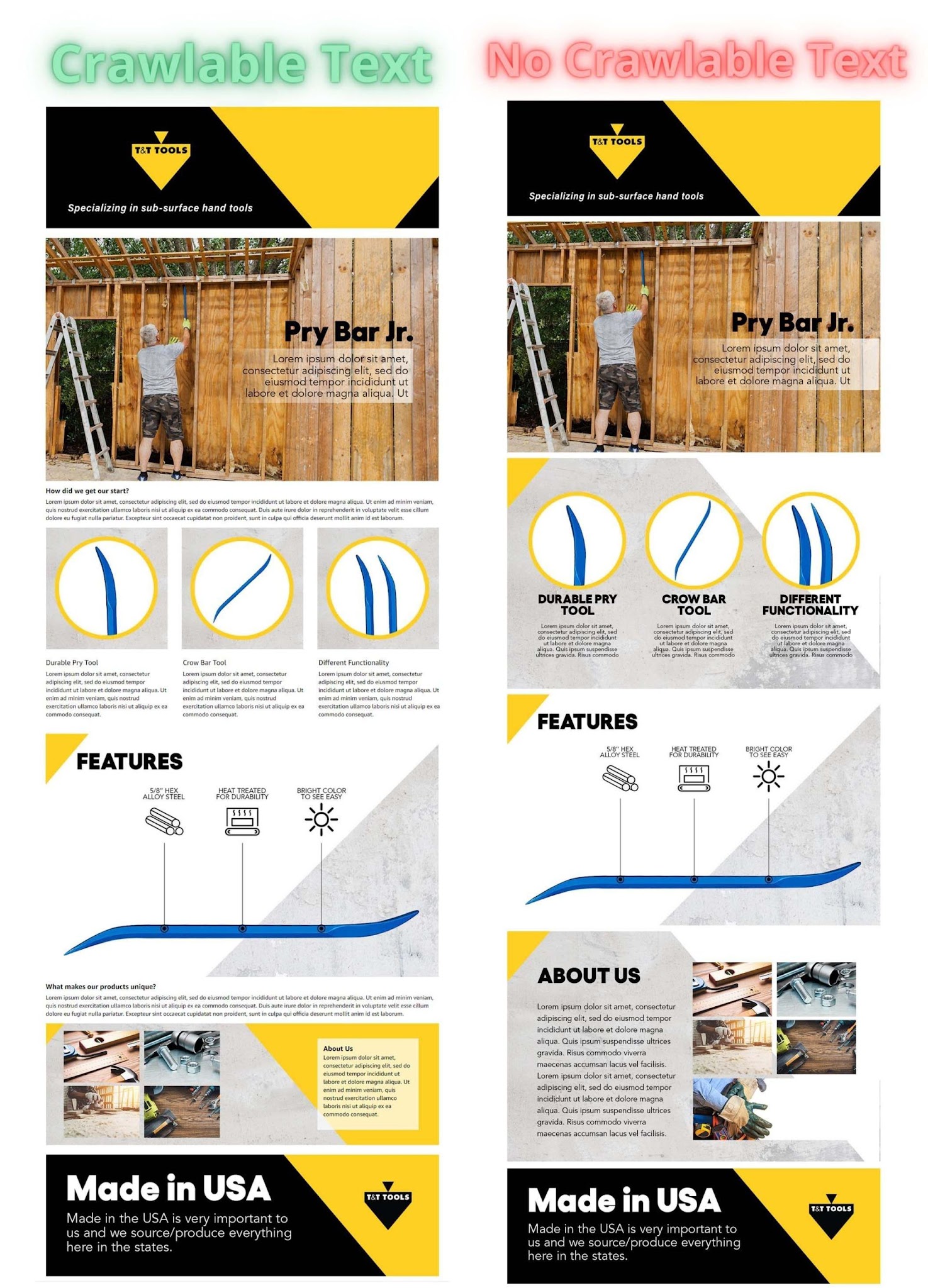
Key Takeaway:
There should be at least 500 words of crawlable text included in A+.
What is Alt Text?
Alt text is the ability to describe images with text for individuals who are unable to see the images. On Amazon, including alt text behind every image inside of the A+ Content allows for further indexing for additional keywords you may not be able to fit into your listing copy and backend keywords.
Goal:
- To get additional keywords to index utilizing Alt Text
- Use 100 characters per image
- Utilize different keywords per image
- Do not use prohibited keywords
How To Add Alt Text:
- Navigate to your A+ content design and click into the image
- From there, you will see "image keywords" (example image here)
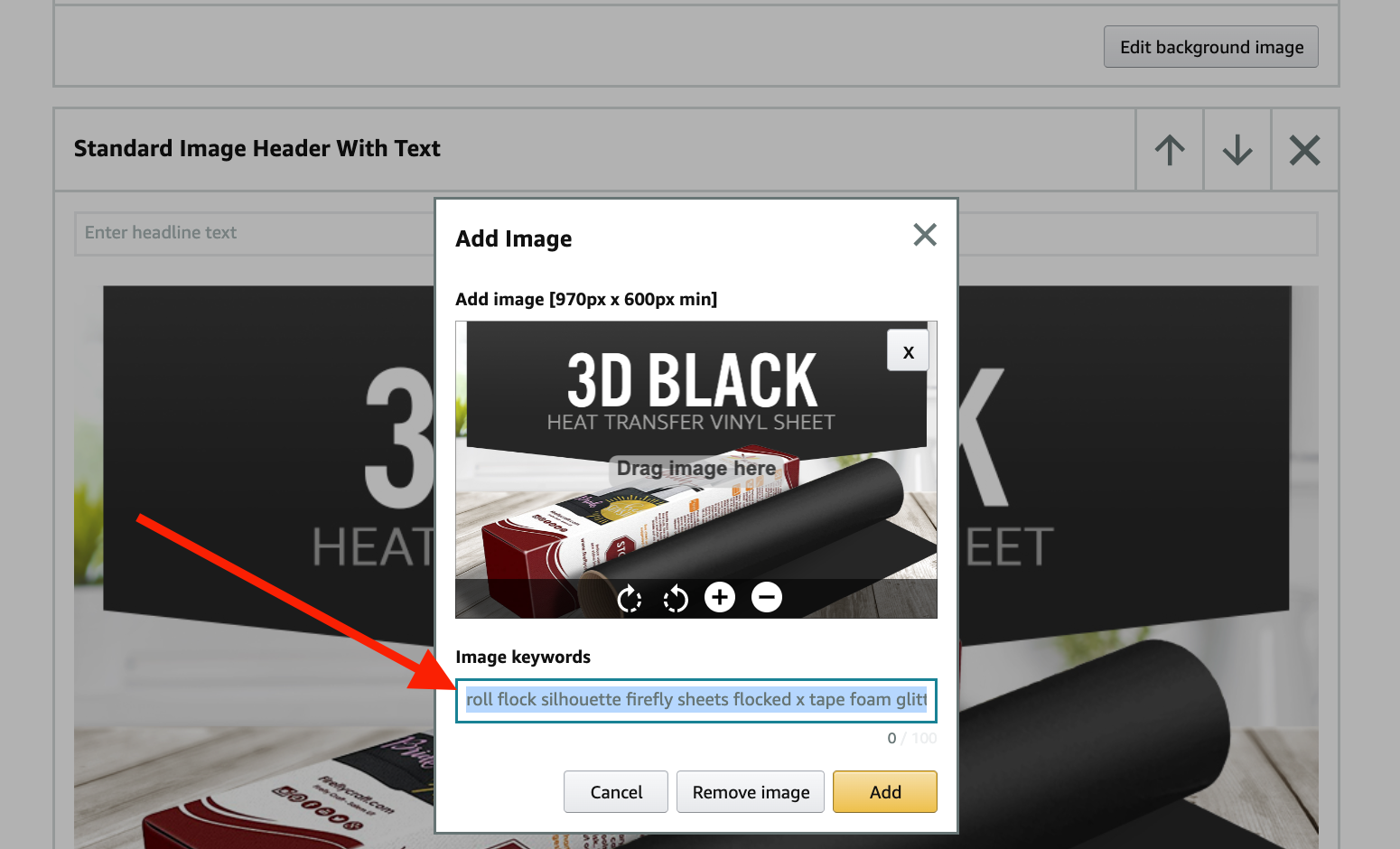
- Import 100 characters of keywords into each image within the design, making sure to not repeat keywords
Video on Alt Text: [ SEO TIP ] Alt Text on A+ Enhanced Brand Content - Amazon FBA Keywords
Step 5: The Backend Description
Summary:
Optimizing your product description is the last part of Amazon Listing Optimization. This is the opportunity to tell your customers the selling points of your product.
There are essential tips for optimizing your product description. Here are as follows:
- Stay within the 2000 character limit
- Use short but clear sentences
- Highlight the features of your product and factual information
- Elaborate on important details such as the “how-to’s”, “to-do’s” and “dont’s”.
- Convince your potential buyers on how your product can make a difference in their daily lives
- Discuss why your product beats your competitors
Here are some of the things you need to avoid:
- Stuffing keywords
- Using special characters or HTML tags
- Including promotional information
- Using of terms like “guaranteed”, “discount” or “great value”
- Website links, customer reviews, prohibited keywords and claims you cannot prove
Reminders:
- After conducting keyword research and deciding the keywords to use for your listing optimization, use your relevant keywords, and organic keywords on the titles and bullets as they hold more bearing in SEO. You can insert your unused, but still, high-volume keywords on your product description.
- Ensure that you focus on your grammar rather than using as many keywords as you can. Remember, quality trumps quantity.
- If you have an A+ Content that hides your product description, you can be a little bit more lenient with your grammar and keywords, but keep your sentences short. Short sentences are more crawlable in SEO.
Take Away:
- Backend descriptions are an essential part of Amazon listing's SEO.
- Including high volume, relevant keywords in this section will allow for more indexing and ranking.
- Ensure your abiding by Amazon's TOS and not using forbidden keywords that will risk a listing yank.
Step 6: Improve your Rankings Through PPC
Amazon PPC and Amazon SEO
Amazon PPC and SEO are a happily married couple, they should work in correlation with one another to enhance organic rankings and overall, sales.
According to Steven Pope's opinion, over the course of about six months, for every PPC sale you make, you have the potential to make three SEO sales. Therefore, by investing in PPC on the keywords that you convert well for, you're increasing organic rankings throughout many different keywords which in turn, will increase your overall sales.
Although you can boost traffic to your listings through PPC, you need to also ensure you’re optimizing your listings correctly in order to convert those clicks into sales. Sending paid traffic to listings that are not fully optimized will not only waste money but also, have a negative effect on organic rankings.
Organic to Sponsored Ratio (The 2:1 Ratio)
As stated above, keeping your SEO and PPC efforts working together is crucial. This allows you to reap the benefits of higher organic rankings over time.
You should, however, keep in mind the ratio between organic and sponsored keywords. You should have 2x the amount of organically indexed SEO keywords as you do PPC keywords. Maintaining this ratio enables you to gain organic traffic for more keywords to maintain profitability, while also pushing paid traffic to supplement the sales and continuously improve overall organic ranking. You can find this ratio of organic to paid keywords on almost any Amazon keyword research tool on the market.
Take Away:
- PPC and organic SEO should work hand in hand with one another in order to gain the most benefits.
- Pushing traffic to keywords is only one-half of the equation. You must also ensure your SEO efforts are in line.
- You should maintain a 2:1 organic to sponsored ratio.
Recap Video Training:
Ad Badger's Amazon SEO Guide Part 1: Getting Started [PPC Den Podcast #111]
Step 7: How to Continue Optimizing your SEO
Summary: Amazon SEO is not a set and forget action. It must be routinely updated, managed, and tracked to get the maximum value from your strategy.
Video: SEO is NOT set and FORGET - Amazon FBA Weekly Q&A - Ask Steven Pope ANY Question
My Amazon Guy has a four-phase SEO management system that we use for our clients and freely give out to the internet community, and sellers and e-commerce enthusiasts, just like you.
4 SEO Phases
Phase 0 MAG SEO (Research)
- SEO team identifies the keywords of value by comparing top 10 competing ASINs and cross references the highest volume keywords that those ASINs rank the best for. Example: Keyword of 10,000 volume,
Phase 1 MAG SEO (Indexing)
- Product launch SEO: Phase 1 employs best practices by reverse engineering competitor listings and researching each product's copy, including back end search terms, (246-249 characters, misspellings, Spanish, relevant keywords), back end attributes, and top keywords placed into bullets and other copy.
- Critical that A+ Content has 500+ words of copy - words, not characters
- Alt Text to be filled in all photos (90-100 characters)
- Timing: To be completed within 72 hours of onboarding. We let Phase 1 matriculate for at least 30 days.
Phase 2 MAG SEO (Pink Keywords)
- Copy Update SEO: This phase incrementally indexes by optimizes listing copy and performs a backend SEO “pink terms update” by identifying and removing duplicate keywords, and replaces them with long tail keywords, misspellings, spanish, etc.
- Timing: Phase 2 is completed 30-60 Days after completion of Phase 1. We let Phase 2 matriculate for at least 30 days.
Phase 3 MAG SEO (Strikezone)
- Advanced Strikezone SEO - This is our final and most advanced phase, which is for mature listings (6+ months old generally) that index for 800+ organic keywords. This phase identifies keywords ranking organically 20-50 and attempts to improve them to rank between 1-19. Must have 50 words in ranks 20-50 before starting.
- Timing: Day 90-180 days from seo phase 1 and repeat every 30-60 days for mature listings that index for 800+ Organic keywords Distribution.
Phase 4 MAG SEO (Market Share)
- MAG’s SEO strategy aims to help increase a brand’s Market Share through SEO by utilizing conversion and click-through rates
- Timing: Rotate keywords every 90 days and must align with Phase 4 SEO goals.
Below are 4 videos where Steven Pope talks in details about SEO Phases 1-3:
- Part 1 SEO Best Practices - SEO Best Practices
- Part 2 Incremental Keyword Gains - Incremental Keyword Gains
- Part 3 Strike Zone Keywords - Strike Zone Keywords
- Part 4 SEO as it relates to PPC - SEO and PPC
- Phase 0 (watch last) The Master Keyword list. - The MKL
SEO Checklist: 10 Things To Do To Every Listing
Summary: Use this checklist as a guide to the 10 things you should do to every listing!
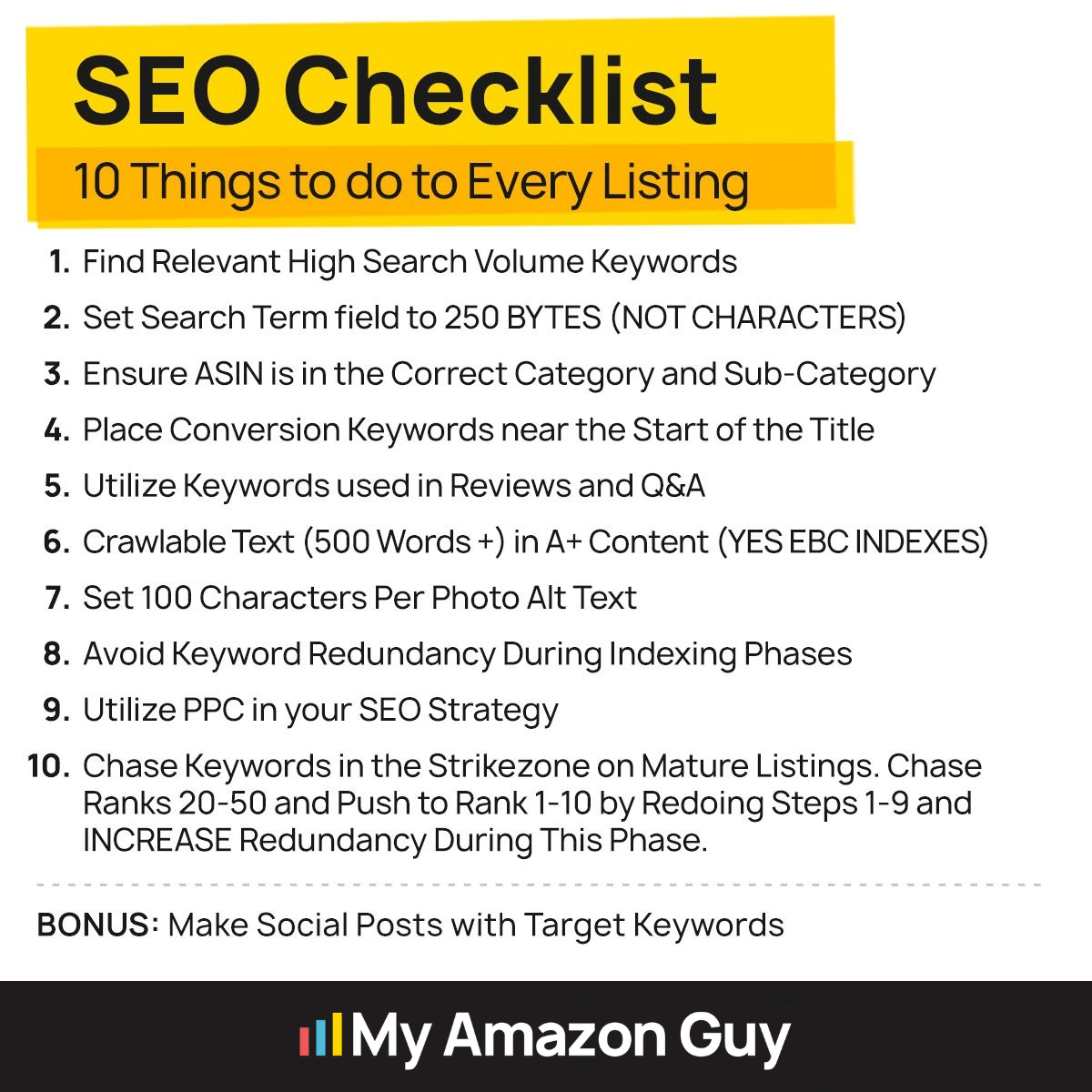
Here at My Amazon Guy, we have a wealth of experience behind us regarding keyword research with Amazon.
We have a fine-tuned understanding of what it takes to select keywords for Amazon product listings and have seen firsthand that sellers are not using their search terms to the fullest.
In addition, we’ve compiled a comprehensive list of keywords and rules to avoid that many aren’t familiar with.
Be sure to check out other useful SEO details and services by visiting our website. Our CEO, Steven Pope also shares his expertise in this video.
"Important Reminder: Keyword rankings are stored at the child ASIN level."